
How to Migrate From Magento to Shopware Without Losing SEO Rankings

Table of Contents+
- Why Are Companies Leaving Magento in 2026?
- What Does a Botched Migration Actually Cost?
- How Do Magento and Shopware 6 Compare for Mid-Market E-Commerce?
- How Do You Audit Your Magento Instance Before Migration?
- What Does a Complete URL Mapping Strategy Look Like?
- How Do You Migrate Product Data Without Breaking Everything?
- How Should You Rebuild Custom Functionality in Shopware?
- How Do You Set Up the SEO Safety Net?
- Why Should You Run Both Systems in Parallel?
- What Does the Cutover and Post-Migration Monitoring Plan Look Like?
- What Migration Timeline Should You Plan For?
- What Are the Most Expensive Mistakes in Magento to Shopware Migrations?
- How Does This Migration Connect to Your Broader Architecture?
- References
TL;DR
A successful Magento to Shopware migration preserves your SEO rankings by combining complete URL mapping, flat 301 redirects, structured data migration, and a 90-day post-cutover monitoring plan. The companies that lose 40-60% of organic traffic skip one or more of these steps.
Key Takeaways
- •Magento 2 reaches end-of-life in 2027, and delaying migration increases both security risk and total migration cost by 15-25% per year of postponement.
- •Botched platform migrations lose 40-60% of organic traffic overnight. A complete URL mapping and flat 301 redirect strategy is the single highest-ROI task in any migration project.
- •Shopware 6 delivers 40-65% faster page load times than Magento 2 out of the box, but only if you migrate structured data, canonical tags, and meta descriptions alongside the URL redirects.
- •Run both systems in parallel for 2-4 weeks before cutover. Compare conversion rates, validate every Tier 1 redirect manually, and monitor Search Console daily for coverage drops.
- •The 90-day post-migration monitoring window is non-negotiable. Teams that stop watching after week 2 miss crawl errors that compound into permanent ranking losses.
Step-by-step Magento to Shopware migration framework that preserves SEO rankings. URL mapping, redirect strategy, data migration, and 90-day monitoring plan.
A successful Magento to Shopware migration preserves your SEO rankings by combining complete URL mapping, flat 301 redirects, structured data migration, and a 90-day post-cutover monitoring plan. The companies that lose 40-60% of organic traffic skip one or more of these steps. This guide covers the full migration framework - from initial audit to post-launch KPI tracking - so your organic revenue survives the transition intact.
Why Are Companies Leaving Magento in 2026?
Adobe Commerce (formerly Magento 2) is approaching end-of-life, with extended support ending in 2027[1]. That deadline is driving a wave of migrations across the DACH market. But EOL is only the most visible pressure. The underlying problems have been building for years.
Magento 2 performance is the primary pain point. The median Magento 2 store delivers a Time to First Byte (TTFB) of 1.2-2.5 seconds on default hosting configurations[2]. Shopware 6, built on Symfony and optimized for modern PHP 8.x, delivers TTFB under 400ms with equivalent hosting. That performance gap translates directly to revenue: a 1-second improvement in page load time increases conversions by 7%[3].
Total cost of ownership compounds the problem. Magento 2 requires specialized PHP developers who understand its complex dependency injection system, XML-based configuration, and EAV (Entity-Attribute-Value) database schema. In the DACH market, Magento 2 senior developers command EUR 85-120/hour because the talent pool is shrinking as developers move to modern frameworks[4]. Shopware 6 developers, working with Symfony and Vue.js - technologies taught in every modern bootcamp - are 20-30% more available and cost EUR 70-95/hour for equivalent seniority.
Security is the third driver. Magento 2 vulnerabilities averaged 12-15 critical patches per year between 2022 and 2025[1]. Each patch requires testing across custom modules, theme overrides, and third-party extensions. For a mid-market store with 30+ custom modules, a single security patch costs 2-4 days of developer time. After EOL, those patches stop coming entirely - and your store becomes a compliance liability under GDPR.
See how our team delivers +35% avg conversion lift across 30+ e-commerce projects.
What Does a Botched Migration Actually Cost?
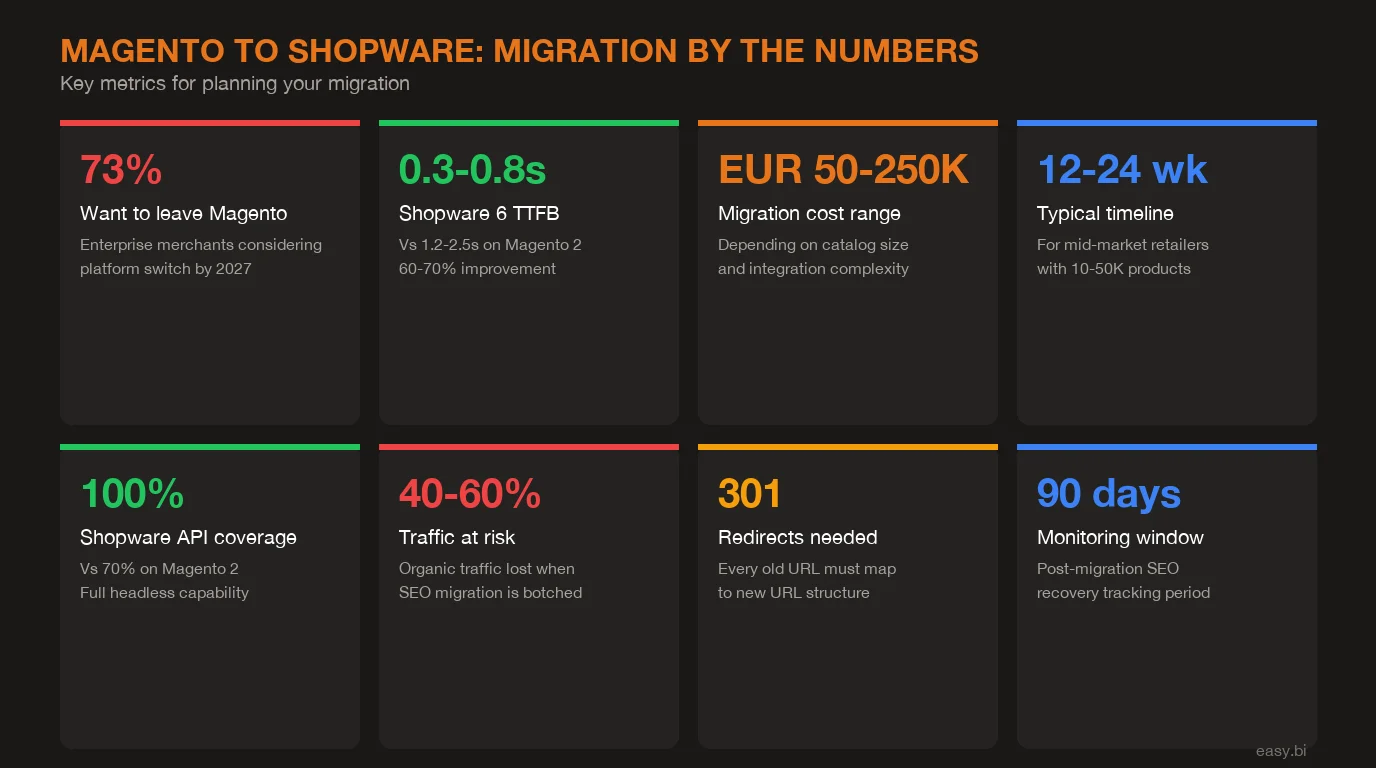
The financial damage from a failed migration is not theoretical. Forrester reports that 60-70% of e-commerce replatforming projects fail to meet their stated objectives[5]. SEO loss is the most common and most expensive failure mode.
Here is the math. A DACH mid-market retailer generating EUR 8M in annual online revenue with 45% of traffic from organic search depends on EUR 3.6M in organic-driven revenue. A botched migration that drops organic traffic by 50% - common when redirects are missing or chained - costs EUR 150,000 per month in lost revenue. Recovery takes 6-12 months with aggressive remediation. Total damage: EUR 900K-1.8M.
Compare that to the cost of doing it right. A comprehensive URL mapping and redirect strategy adds EUR 8,000-15,000 to the migration budget and 2-3 weeks to the timeline. That is a 60-120x return on investment. No other line item in the migration budget delivers this ratio.
The cascade of a failed SEO migration follows a predictable pattern. In weeks 1-2, Google crawls the new site and discovers thousands of 404 errors where indexed URLs used to be. Organic traffic drops 30-50% overnight. By week 4-6, Google deindexes pages that consistently return errors. Rankings built over years disappear. Paid search spend spikes as the marketing team tries to compensate. Months 3-6 bring slow, partial recovery as retroactive redirects are implemented - but redirect chains form because the fix was rushed, and some pages never return to their pre-migration positions because competitors filled the gap.
How Do Magento and Shopware 6 Compare for Mid-Market E-Commerce?
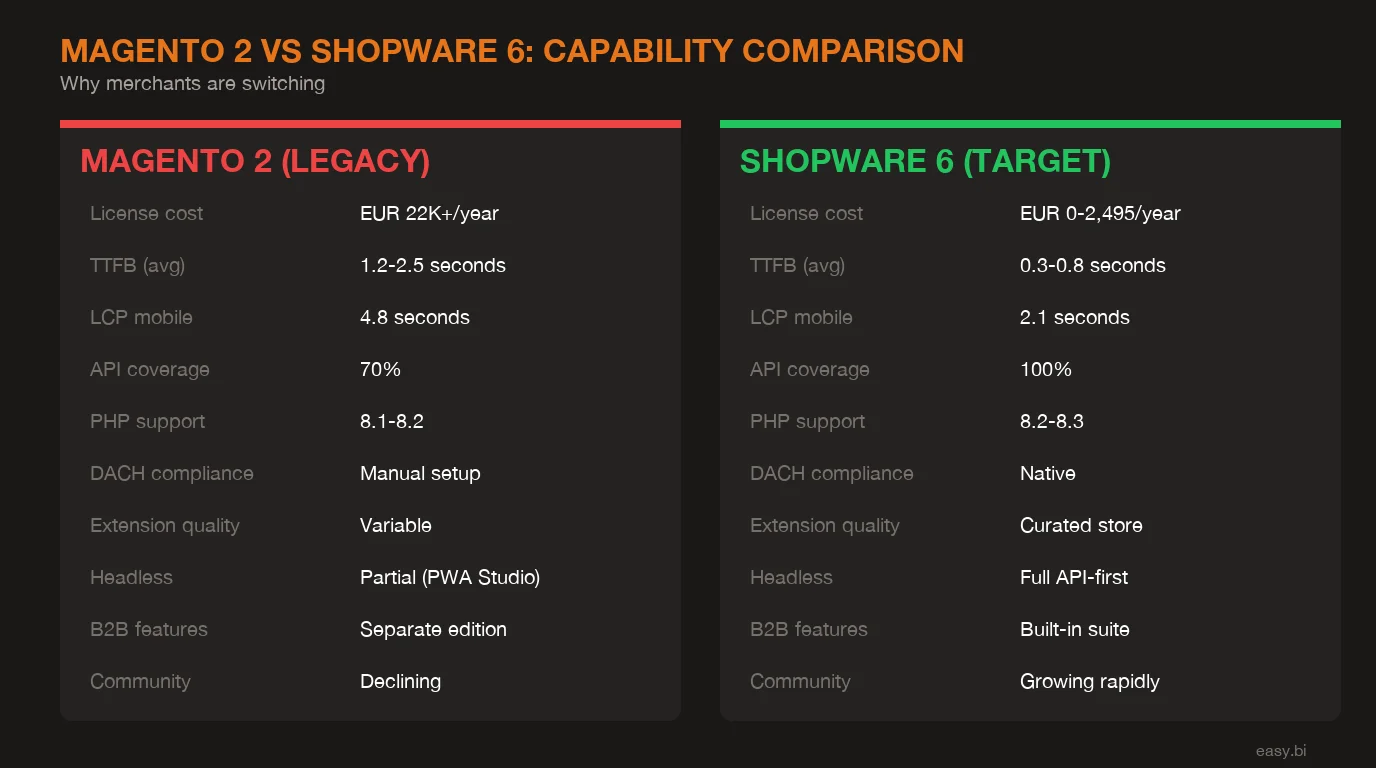
Before diving into the migration process, understanding the architectural differences helps you plan what changes and what stays the same.
| Capability | Magento 2 / Adobe Commerce | Shopware 6 |
|---|---|---|
| Framework | Custom PHP framework, XML config | Symfony 6, PHP 8.2+ |
| Frontend | Luma / Hyva theme (PHP templates) | Twig templates + Vue.js storefront |
| API | REST + GraphQL | Store API + Admin API (REST/JSON) |
| TTFB (median) | 1.2-2.5 seconds | 200-400ms |
| LCP (median) | 3.5-5.0 seconds | 1.8-2.8 seconds |
| Extension ecosystem | 4,800+ on Marketplace | 4,000+ on Shopware Store |
| B2B features | Requires B2B module (paid) | Native in commercial plans |
| CMS | Page Builder (basic) | Shopping Experiences (advanced) |
| Search | Elasticsearch (requires setup) | Elasticsearch built-in |
| Hosting | Self-hosted or Adobe Cloud | Self-hosted, Shopware Cloud, or PaaS |
| License cost (enterprise) | USD 22,000-125,000/year | EUR 2,495/month (Evolve plan) |
The performance difference is the most immediately measurable improvement. Shopware 6 stores pass Core Web Vitals at 2-3x the rate of Magento 2 stores[2]. Since Google uses Core Web Vitals as a ranking signal, the platform switch itself can improve SEO performance - but only if you preserve the existing ranking signals during migration.
How Do You Audit Your Magento Instance Before Migration?
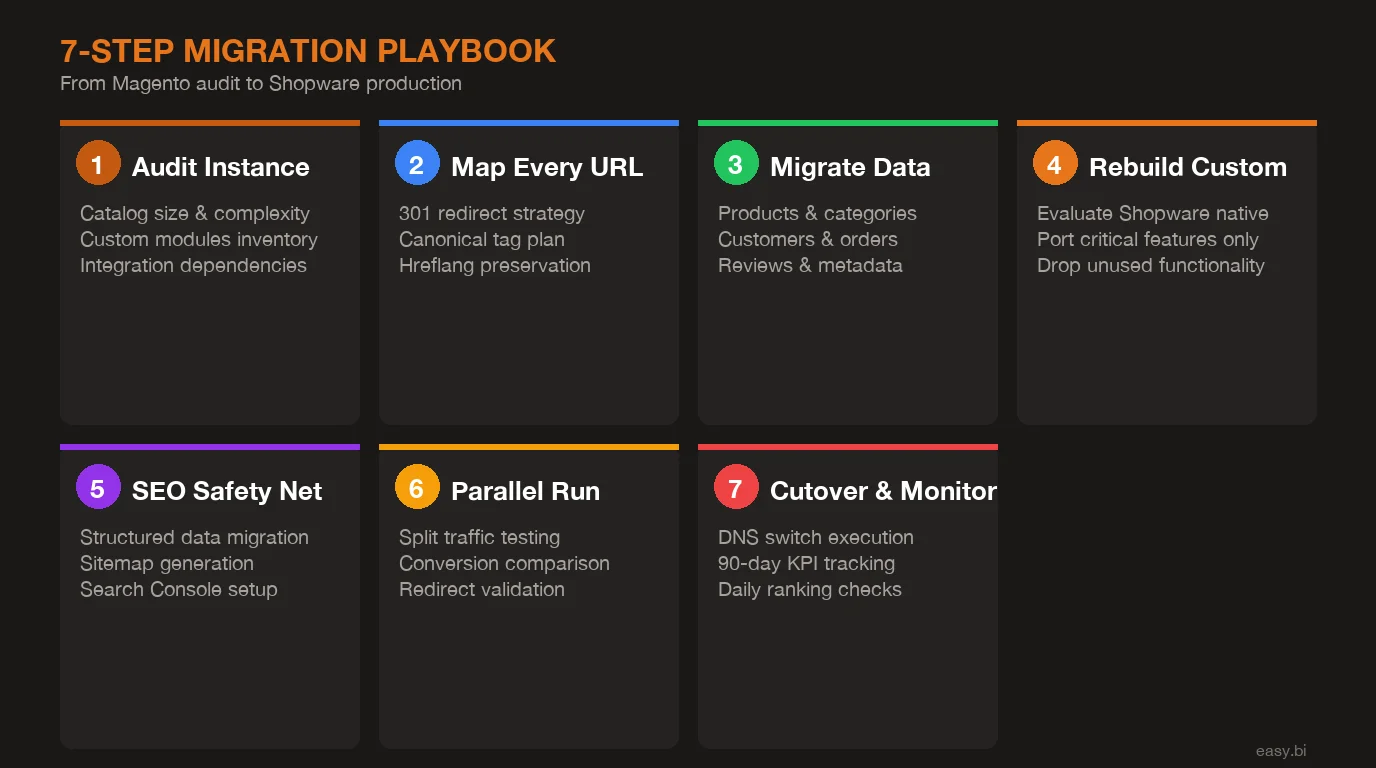
The audit is the foundation. Skip it and every subsequent step operates on assumptions instead of data. At easy.bi, we run a standardized 2-week discovery sprint before writing a single line of migration code. Here is what it covers.
Crawl every indexed URL. Use Screaming Frog or Sitebulb to export the complete URL inventory. A typical mid-market Magento store has 15,000-80,000 indexed URLs across product pages, category pages, CMS content, and filtered navigation views. Export the full list with HTTP status codes, canonical tags, meta titles, meta descriptions, and internal link counts.
Catalog custom modules. List every custom module in app/code/ and every third-party module in vendor/. For each one, document what it does, whether Shopware has a native equivalent, and whether the business still needs it. In our experience across 100+ migrations, 25-35% of custom Magento modules are no longer actively used but nobody removed them[6].
Map integrations. Document every external system connection: ERP (SAP, Microsoft Dynamics, DATEV), PIM (Akeneo, Pimcore), CRM (Salesforce, HubSpot), payment providers (Adyen, Mollie, PayPal), shipping (DHL, DPD), and marketing tools (Emarsys, Klaviyo). Each integration needs a migration plan. Some have Shopware plugins ready. Others require custom connector development. The integration layer accounts for 30-50% of total migration effort in mid-market projects.
Analyze traffic patterns. Export 12 months of Google Analytics data segmented by page type. Identify your Tier 1 pages (top 100 by organic revenue), Tier 2 pages (top 500 by organic sessions), and long-tail pages. This tiering determines redirect validation priority and directly affects your SEO survival rate.
What Does a Complete URL Mapping Strategy Look Like?
URL mapping is the single most important deliverable in any Magento to Shopware migration. It is also the one most frequently left to the last sprint. That sequencing error is responsible for more organic traffic losses than any technical failure.
Magento and Shopware use fundamentally different URL structures. Magento generates product URLs like /catalog/product/view/id/123 or, with URL rewrites enabled, /product-name.html. Shopware 6 generates URLs like /detail/abc123def456 by default or /product-name/abc123def456 with SEO URLs configured. Category URLs differ similarly: Magento uses /category-name.html, Shopware uses /category-name/.
Every URL difference without a redirect is a broken ranking signal. The mapping spreadsheet needs these columns: old URL, new URL, redirect type (301 for permanent moves, 410 for intentional removals), page type (product, category, CMS, blog), and priority tier. For a store with 30,000 indexed URLs, this spreadsheet is your most valuable migration asset.
Flat redirects only. No chains. If URL A redirects to URL B and URL B redirects to URL C, each hop loses 10-15% of PageRank and adds latency[9]. Every redirect must be a single hop from old URL to final URL. When you discover legacy redirects from a previous migration (common with Magento stores that migrated from Magento 1), update the original rule to point directly to the Shopware URL.
Canonical tags. Every product and category page on Shopware needs a self-referencing canonical tag. If your Magento store used canonical tags to consolidate filtered navigation views, replicate that logic in Shopware. Shopware 6 handles basic canonicalization, but custom filter URLs and paginated categories need manual configuration.
Hreflang for multi-language stores. If your Magento store serves DE, AT, and CH with separate store views, your Shopware sales channels need identical hreflang annotations. Missing hreflang tags cause Google to treat your language variants as duplicate content - and your German rankings drop while Google figures out which version to index.
How Do You Migrate Product Data Without Breaking Everything?
Product data migration has two phases: automated transfer and manual validation. The Shopware Migration Assistant plugin handles the first phase. Everything else is manual.
The Migration Assistant connects to your Magento 2 database and transfers products, categories, customers, orders, media files, and basic CMS pages. For a clean Magento installation with standard attributes, this covers 50-70% of data migration work. But mid-market stores are never clean. Custom product attributes, configurable product variants, bundle products, and downloadable products all require mapping to Shopware's equivalent data structures.
Magento's EAV (Entity-Attribute-Value) database schema stores product attributes across multiple tables. Shopware 6 uses a flat JSON-based custom field system. This architectural difference means every custom attribute needs explicit mapping. A product attribute stored as an EAV record in catalog_product_entity_varchar becomes a custom field in Shopware's product table. The data types may not match: Magento's multiselect attribute becomes a JSON array in Shopware. Get the mapping wrong and your filtered navigation breaks.
Customer data migration. Magento uses bcrypt password hashing. Shopware 6 also supports bcrypt, so customer passwords can migrate without forcing a reset - but only if you implement a custom password encoder that handles Magento's specific salt format. Skipping this step forces every customer to reset their password on first login. For a store with 50,000+ customer accounts, that means thousands of support tickets and lost repeat purchases in the first month.
Order history. Migrate historical orders for customer self-service and analytics continuity. The Migration Assistant handles basic order transfer, but custom order statuses, partial shipments, and return records need manual mapping. Decide upfront whether you need full order history or just the last 12-24 months - migrating 5 years of order data adds complexity without proportional business value.
Product reviews. Reviews carry SEO value as user-generated content and social proof that drives conversions. Magento stores reviews in review and review_detail tables. Shopware stores them in product_review. The Migration Assistant transfers reviews, but rating scales may differ (Magento uses 1-5 stars per criterion, Shopware uses a single 1-5 rating). Map the average rating or you lose the review signal.
How Should You Rebuild Custom Functionality in Shopware?
The migration is not a 1:1 port. Treating it as one is the most expensive mistake I see as CTO reviewing migration architectures. Shopware 6 is a different platform with different strengths. The goal is equivalent business outcomes, not equivalent code.
Start with a module-by-module evaluation matrix:
| Module Category | Magento Approach | Shopware 6 Approach | Migration Effort |
|---|---|---|---|
| Custom pricing rules | Catalog/Cart price rules + custom module | Rule Builder (native) | Configuration only |
| B2B customer groups | B2B module (paid add-on) | Native in commercial plans | Configuration + data mapping |
| Product configurator | Custom module | Custom plugin or marketplace | 4-8 weeks development |
| ERP sync | Custom module or middleware | Custom plugin or middleware | 6-12 weeks development |
| Advanced search | Elasticsearch + custom module | Elasticsearch (built-in) | Configuration + tuning |
| Checkout customization | Custom module + theme override | Custom plugin | 2-6 weeks development |
| Multi-warehouse | MSI (Multi-Source Inventory) | Stock management (native) | Configuration + data mapping |
The 40% of modules that have native Shopware equivalents represent the biggest ROI in the migration. You replace custom code that requires maintenance with platform features that Shopware maintains. Every module you eliminate from your custom codebase reduces your ongoing maintenance burden by EUR 2,000-5,000 per year[6].
For modules that need custom Shopware plugin development, resist the urge to replicate Magento logic. Instead, define the business requirement and implement it using Shopware's extension patterns. Shopware's plugin system uses Symfony bundles, dependency injection, and event subscribers - patterns that are well-documented and maintainable by any Symfony developer. Magento's plugin system (interceptors, plugins, preferences) is Magento-specific and harder to staff for.
Payment and shipping providers need special attention. If your Magento store uses Adyen, Mollie, or Stripe, verify that Shopware plugins exist with equivalent feature sets. Payment provider differences are the number one source of post-launch checkout failures in migrations. Test every payment method, every currency, and every edge case (partial refunds, subscription renewals, 3D Secure flows) on staging before cutover.
How Do You Set Up the SEO Safety Net?
The SEO safety net is a set of technical implementations that protect your organic rankings during and after cutover. Missing any single component can cause ranking losses that take months to recover.
Redirect implementation. Load your complete URL mapping into Shopware's redirect system or, for large redirect sets (10,000+ rules), implement them at the server level (Nginx or Apache) or CDN level (Cloudflare, Fastly). Server-level redirects execute faster than application-level redirects, which matters when Google is crawling thousands of URLs per day. Validate every Tier 1 redirect manually using curl or a redirect checker. For Tier 2 and 3, run an automated crawl comparison.
Structured data migration. If your Magento store has Product schema, BreadcrumbList, Organization schema, or FAQ schema, implement identical structured data on the Shopware store. Google uses structured data for rich results - losing it means losing rich snippets in search results, which reduces click-through rates by 20-30%[7]. Validate with Google's Rich Results Test on staging.
XML sitemap generation. Configure Shopware to generate XML sitemaps that include all product, category, and CMS pages. Compare the new sitemap against the old one: every URL in the old sitemap should either appear in the new sitemap or have a 301 redirect to a URL that does. Submit the new sitemap to Google Search Console immediately after cutover.
Meta title and description migration. Export all meta titles and descriptions from Magento and import them into Shopware. Do not let Shopware auto-generate them from product names - auto-generated meta descriptions are generic and lose the keyword optimization built into your existing metadata. This is a data migration task, not a content task. Preserve what works and optimize later.
Internal link audit. After migration, crawl the new Shopware store and verify that zero internal links point to old Magento URLs. Internal links that trigger redirects waste crawl budget and add latency. Update every internal link to point directly to the new URL. Shopware's Shopping Experiences editor and CMS blocks all need checking - template-level links are easy to miss.
+35% conversion. +22% AOV. EUR 50M+ GMV processed.
Our Shopware-certified team delivers e-commerce at scale with 14-day sprint cycles. 80% less manual work through system integrations.
Start with a Strategy CallWhy Should You Run Both Systems in Parallel?
A parallel run is the difference between a controlled migration and a gamble. Running both Magento and Shopware simultaneously for 2-4 weeks before full cutover gives you data instead of assumptions.
The parallel run has three objectives. First, validate redirects under real traffic conditions. Automated testing catches 95% of redirect issues, but real user behavior - bookmarks, email links, third-party referrals - reveals the remaining 5% that matters. Second, compare conversion rates between the old and new platform. If Shopware converts at a lower rate on the same traffic, you have a UX issue to fix before going all-in. Third, stress test the new infrastructure. Magento handles your peak load today. Will Shopware handle it tomorrow? A parallel run lets you find out without risking revenue.
The technical setup uses DNS-level traffic splitting or a reverse proxy (Nginx, Cloudflare Workers) to route a percentage of traffic to the new Shopware instance. Start with 5-10% and increase over 2 weeks. Monitor these KPIs at each traffic increment: page load time (TTFB, LCP, CLS), conversion rate by device type, cart abandonment rate, checkout completion rate, and error rates (4xx, 5xx). Companies that use phased rollouts for platform migrations experience 60% fewer post-launch incidents than those doing a single cutover[8].
The parallel run also builds team confidence. Your support team learns the new admin interface while the old system is still available as a fallback. Your marketing team verifies that tracking pixels, conversion events, and analytics tags fire correctly on the new platform. Your operations team confirms that order processing, ERP sync, and fulfillment workflows function end-to-end. All of this happens with a safety net - if anything breaks, you route traffic back to Magento in minutes.
What Does the Cutover and Post-Migration Monitoring Plan Look Like?
Cutover day is the beginning of monitoring, not the end of the project. The first 90 days after migration determine whether your SEO investment survives.
Cutover checklist (day 0):
- Switch DNS to point to Shopware infrastructure
- Verify all SSL certificates are active and correctly configured
- Submit updated XML sitemaps to Google Search Console and Bing Webmaster Tools
- Request indexing for your top 50 pages using Search Console's URL Inspection tool
- Verify robots.txt allows crawling of all intended pages
- Confirm Google Analytics / GA4 and all tracking tags fire on the new domain
- Test 3 real transactions end-to-end (different payment methods, different devices)
Week 1 monitoring (daily): Check Search Console for coverage errors. Every new 404, soft 404, or redirect error needs immediate investigation. Monitor your top 50 keywords in a rank tracker (Sistrix, SEMrush, or Ahrefs). Some fluctuation is normal - Google processes redirects over days, not hours. Flag any keyword that drops more than 10 positions for investigation.
Week 2-4 monitoring (every 2 days): Track index coverage in Search Console. The number of indexed pages should stabilize within 2-3 weeks. If indexed page count keeps dropping, you have missing redirects or crawl issues. Compare organic traffic week-over-week against pre-migration baselines. A 5-15% dip in weeks 1-3 is normal and should recover by week 6. A 30%+ dip indicates a structural problem - missing redirects, canonicalization errors, or blocked resources.
Month 2-3 monitoring (weekly): Track organic revenue, not just traffic. If traffic recovers but revenue does not, the migration introduced a conversion problem - likely a UX change that affects purchase behavior. Compare bounce rates and time-on-site by page type against pre-migration data. Monitor Google's crawl stats in Search Console: crawl rate, response time, and pages crawled per day should match or exceed pre-migration levels within 60 days.
What Migration Timeline Should You Plan For?
Migration timelines vary by project complexity. Here is the breakdown by store size, based on our experience across DACH mid-market migrations at easy.bi.
| Project Size | SKUs | Custom Modules | Integrations | Timeline | Budget Range |
|---|---|---|---|---|---|
| Basic | Under 5,000 | 0-5 | 1-2 (payment, shipping) | 8-12 weeks | EUR 30-60K |
| Mid-Market | 5,000-50,000 | 5-20 | 3-5 (ERP, PIM, CRM) | 3-6 months | EUR 60-180K |
| Enterprise | 50,000+ | 20+ | 5+ (ERP, PIM, CRM, WMS, marketing) | 6-12 months | EUR 150-500K+ |
These timelines include the 2-week discovery sprint, parallel run period, and first 30 days of post-migration monitoring. The most common scheduling mistake is compressing the URL mapping and redirect work into the final 2 weeks. That work needs to start in week 1 of the project and run in parallel with development through to launch.
At easy.bi, our 14-day sprint delivery model structures every migration as a series of fixed-scope increments. Sprint 1 delivers the audit and URL mapping. Sprint 2 covers data migration setup and validation. Sprints 3-6 handle custom functionality and integrations. The final 2-3 sprints focus on SEO validation, parallel run, and cutover. Each sprint produces working, testable output - not documentation that sits in a shared drive until launch week.
What Are the Most Expensive Mistakes in Magento to Shopware Migrations?
After overseeing the technical architecture of dozens of platform migrations, I see the same failures repeat. Every one of them is preventable with proper planning.
Treating the migration as a 1:1 port. Teams that try to replicate every Magento feature in Shopware spend 40-60% more than teams that evaluate business requirements fresh. Shopware 6 is a different platform. It handles pricing rules, B2B features, and content management differently - and often better. Evaluate what you need, not what you had.
Skipping the parallel run. A direct cutover with no traffic testing is a gamble with your revenue. Even if everything works in staging, production traffic reveals issues that synthetic tests miss: CDN configuration, real-world payment flows, third-party script conflicts, and edge cases in redirect rules. The 2-4 week parallel run costs EUR 3,000-8,000 in additional infrastructure. A botched cutover costs EUR 50,000-200,000 in lost revenue.
Ignoring image URL redirects. Google Image Search drives 10-22% of traffic for visual product categories (fashion, home, furniture)[9]. Magento stores images at paths like /pub/media/catalog/product/a/b/image.jpg. Shopware stores them in /media/ with hashed filenames. Without image redirects, you lose all image search traffic on day one. Add image URL mapping to your redirect spreadsheet.
Migrating during peak season. Do not launch a platform migration in October or November for a B2C retailer. Q4 accounts for 30-40% of annual e-commerce revenue in the DACH market. The ideal migration window is January-March or May-June - low traffic periods where a temporary ranking dip has minimal revenue impact.
No rollback plan. Every migration needs a documented rollback procedure. If Shopware checkout fails catastrophically on day 2, you need to switch back to Magento within 30 minutes. That means keeping Magento running and DNS-switchable for at least 2 weeks post-cutover. The cost of maintaining Magento for 2 extra weeks is negligible compared to the cost of being unable to take orders.
How Does This Migration Connect to Your Broader Architecture?
A Magento to Shopware migration is often the catalyst for broader architectural improvements. If you are already investing in a platform change, consider whether adjacent upgrades make the total project more valuable.
Cloud-native infrastructure can reduce your hosting costs by 30-50% while improving scalability. If you are moving from Magento's self-hosted model anyway, deploying Shopware on Kubernetes gives you auto-scaling, zero-downtime deployments, and infrastructure-as-code - capabilities that pay dividends well beyond the migration.
An API-first architecture layer between Shopware and your ERP/PIM/CRM systems creates clean integration boundaries. Instead of point-to-point connections that break when any system changes, you build an integration layer that absorbs change. This is especially valuable for DACH mid-market companies running SAP, where ERP upgrades trigger downstream integration failures.
For a comprehensive approach to SEO preservation during any platform change, our e-commerce SEO migration guide covers the strategy layer that sits above the Magento-to-Shopware specifics in this post.
The migration is an opportunity - not just a risk. Companies that treat it as a checkbox ("move from A to B") get a new platform but no new capabilities. Companies that treat it as a strategic investment come out with faster page loads, lower maintenance costs, better developer availability, and an architecture that supports the next 5 years of growth. The difference is entirely in the planning.
References
- [1] Adobe (2024). "Adobe Commerce / Magento Open Source Software Lifecycle Policy - experienceleague.adobe.com
- [2] HTTP Archive / CrUX (2025). httparchive.org
- [3] Google / Deloitte (2023). deloitte.com
- [4] Bitkom (2025). "IT-Fachkraeftemangel in Deutschland - Developer salary benchmark
- [5] Forrester (2023). "Reduce the Risk of Commerce Replatforming - Replatforming fai forrester.com
- [6] Lunendonk Studie (2024).
- [7] Search Engine Journal (2024). searchenginejournal.com
- [8] Google Cloud / DORA (2024). cloud.google.com
- [9] Ahrefs (2023). "301 Redirects for SEO: Everything You Need to Know - Redirect ch ahrefs.com
Explore Other Topics
Ready to scale your e-commerce?
30-minute call with an engineering lead. No sales pitch - just honest answers about your project.
98% engineer retention · 14-day delivery sprints · No lock-in contracts
Related Reading

Shopware Plugin Development: Build vs Marketplace vs Custom
Shopware plugin development: marketplace vs custom vs extended. Decision framework, cost analysis, and 8-point quality checklist.
Christian Kaspar
Shopware 6 vs Shopify Plus: Which Fits DACH Enterprise Retail?
Shopware 6 vs Shopify Plus for DACH enterprise retail: honest comparison of costs, DACH compliance, customization, and when each platform fits your business.
Enno Bassen
How Much Does a Shopware Enterprise Build Cost in 2026?
Shopware enterprise builds cost EUR 30K to 500K+ in 2026. Transparent breakdown of cost tiers, hidden fees, and what drives budget overruns in DACH.
Enno Bassen