
How to Run Two Systems at Once: The Parallel-Run Playbook

Table of Contents+
- Why Does the Big-Bang Rewrite Fail?
- What Is the Strangler Fig Pattern and How Does It Work?
- How Do Feature Flags Enable Safe Parallel Runs?
- How Do You Solve the Data Synchronization Problem?
- What Is the Right Parallel Period Length?
- How Do You Build a Rollback Strategy That People Trust?
- What Does the Phase-by-Phase Timeline Look Like?
- How Do You Address the Fear Factor?
- References
TL;DR
Running legacy and new systems in parallel during migration reduces the risk of big-bang rewrites, which fail 75 to 90% of the time. This playbook covers the strangler fig pattern, feature flags for traffic routing, change data capture for data synchronization, explicit rollback triggers, and a phase-by-phase timeline from shadow testing through full cutover.
Key Takeaways
- •Big-bang rewrites succeed only 10 to 25% of the time, while incremental migration using the strangler fig pattern reduces project risk by 79% according to developer surveys - the parallel run is how you bridge the gap safely.
- •The parallel period length depends on system criticality: 2 to 4 weeks for non-critical systems, 4 to 8 weeks for business-critical systems, and 8 to 16 weeks for revenue-critical or compliance-bound systems.
- •Feature flags reduce deployment-related incidents by 89% and improve mean time to recovery by up to 3x - they are the single most important technical enabler for safe parallel runs.
- •Data synchronization is the hardest problem in parallel runs. Use change data capture over dual-write to avoid consistency issues, and implement automated reconciliation that runs every cycle to catch drift before users do.
- •The fear factor is real but manageable. Address it by running shadow traffic tests before going live, defining explicit rollback triggers with numeric thresholds, and giving the operations team a one-click rollback mechanism.
61% of migration projects exceed planned timelines. This playbook covers the strangler fig pattern, feature flags, data synchronization, and rollback strategies for running legacy and new systems in parallel.
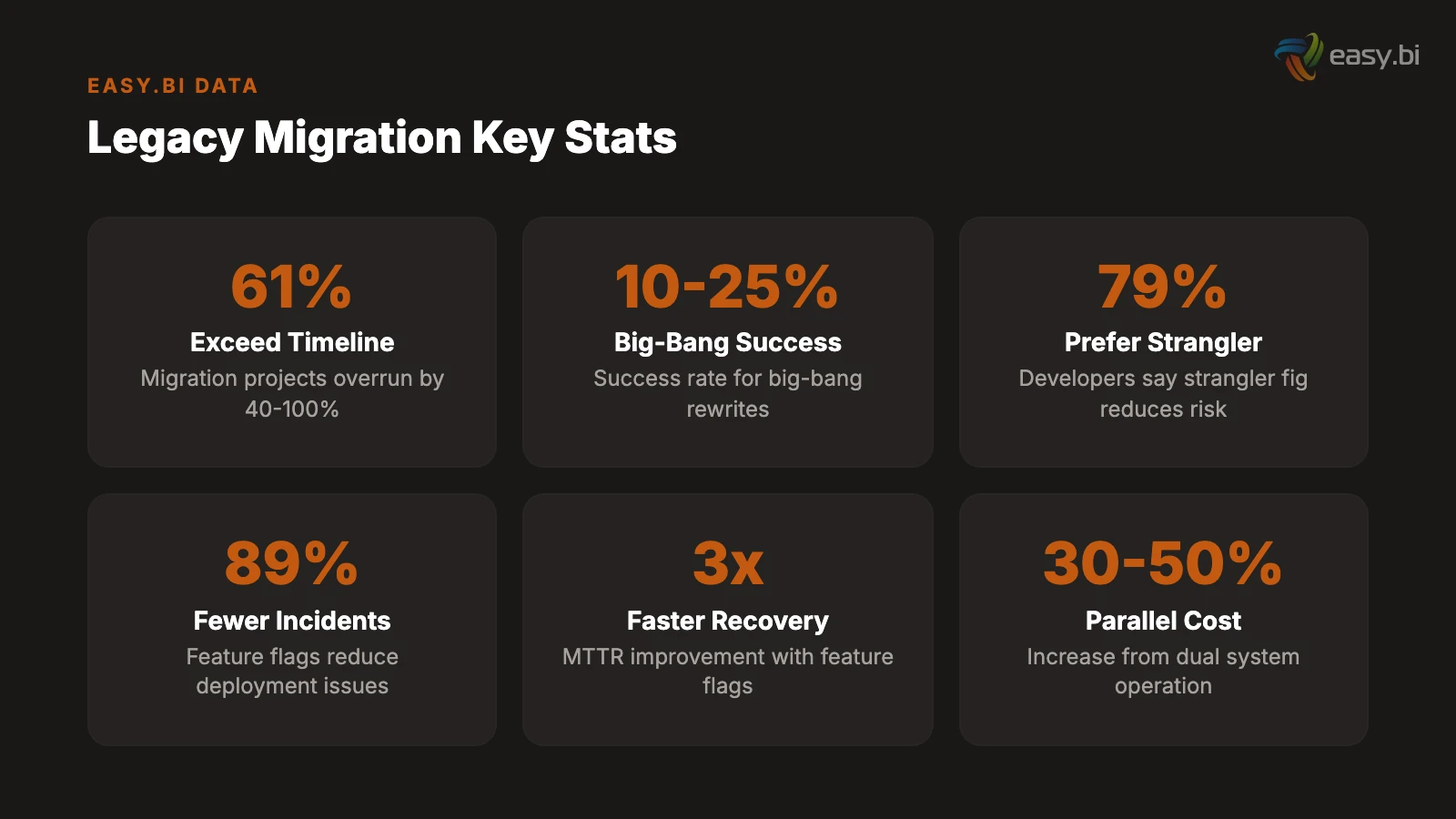
61% of migration projects exceed planned timelines by 40 to 100%, causing budget overruns and business disruption.[1] The most common cause is not technical complexity. It is the migration strategy itself - specifically, the decision to attempt a big-bang cutover instead of running old and new systems in parallel.
Big-bang rewrites succeed only 10 to 25% of the time.[2] The rest join the graveyard of abandoned multi-year projects that consumed millions before being cancelled. The alternative - running both systems simultaneously during a controlled transition period - is operationally harder but dramatically safer. A survey of developers by Lightbend found that 79% said the strangler fig approach reduces project risk compared to big-bang rewrites.[2]
This is the playbook for running two systems at once. It covers the migration pattern, the data synchronization strategy, the rollback mechanism, and the organizational discipline required to manage a parallel run without losing your team's sanity or your stakeholders' confidence.
Why Does the Big-Bang Rewrite Fail?
The big-bang approach sounds rational: build the new system completely, test it thoroughly, switch over on a weekend, decommission the old system on Monday. In practice, it fails because it compresses all risk into a single moment - the cutover - and assumes that moment will go perfectly.
It never goes perfectly.
Undiscovered dependencies surface at cutover. Legacy systems accumulate undocumented integrations, implicit data dependencies, and business rules that exist only in code nobody reads. 73% of enterprises still rely on systems over 10 years old,[1] and those systems have spent a decade growing connections that no architecture diagram captures. During a big-bang cutover, each undiscovered dependency becomes a production incident.
Testing cannot replicate production. No staging environment perfectly mirrors production. Data volumes differ. User behavior patterns differ. Third-party system response times differ. The only way to know if the new system works in production is to run it in production - and a big-bang cutover gives you exactly one chance to find out. If it fails, you are rolling back under pressure at 2 AM while the CEO asks for status updates every 15 minutes.
The timeline spirals. Big-bang rewrites start with an 18-month estimate and end at 36 months - if they end at all. Maintaining parallel systems can increase migration costs by 30 to 50% due to dual licensing and staffing,[3] but the cost of a failed big-bang rewrite is the entire project budget plus the cost of starting over. Large IT projects run 45% over budget on average.[4] Big-bang rewrites run higher because there is no intermediate value delivery - the project either succeeds completely or fails completely.
In my experience as CTO, the organizations that attempt big-bang rewrites are usually the ones that underestimate how much institutional knowledge is embedded in the legacy system. They treat the old system as a specification for the new one, but the old system is not a specification - it is 10 years of accumulated decisions, workarounds, and edge case handling that nobody documented. The strangler fig approach respects that complexity by migrating incrementally.
See how we deliver 60% faster time-to-market with 40% lower TCO than off-the-shelf.
What Is the Strangler Fig Pattern and How Does It Work?
The strangler fig pattern - named after the tropical plant that gradually envelops and replaces its host tree - is an incremental migration strategy where new functionality is built in the new system while the old system continues handling existing traffic. Over time, the new system takes over more capability until the legacy system handles nothing and can be decommissioned.[5]
The pattern has three phases.
Phase 1: Intercept. Place a routing layer (API gateway, reverse proxy, or load balancer) in front of the legacy system. All traffic flows through this layer, which initially routes 100% of requests to the old system. This layer is the control point for the entire migration - it determines which system handles which requests and enables instant rollback by rerouting traffic.
Phase 2: Strangle. Build new functionality in the new system and redirect specific routes from the legacy system to the new system through the routing layer. Start with low-risk, self-contained modules: a reporting dashboard, a settings page, a read-only data view. Each migration is a small, reversible step. If the new system fails on a specific route, the routing layer redirects that route back to the legacy system in seconds.
Phase 3: Decommission. When the new system handles 100% of traffic and has been stable for the agreed parallel period, decommission the legacy system. Do not rush this step. The legacy system costs money to run, but decommissioning it prematurely - before all edge cases have surfaced in production - costs more.
The full migration of a large monolith using the strangler fig pattern typically takes 2 to 5 years, depending on the size of the system, the clarity of its domain boundaries, and the resources allocated to the migration.[5] That timeline sounds long, but every increment delivers value. The team is not waiting 3 years for a single deployment. They are deploying improvements every 2 weeks while the legacy system continues to serve production traffic.
"The strangler fig pattern is not a compromise. It is the engineering-correct approach to migration. Every big-bang rewrite I have seen fail could have succeeded as an incremental strangler migration that delivered value continuously instead of betting everything on a single cutover."
How Do Feature Flags Enable Safe Parallel Runs?
Feature flags are the operational mechanism that makes parallel runs manageable. They allow you to route traffic between old and new systems at the feature level, the user level, or the percentage level - without redeploying code.
Studies show an 89% drop in deployment-related issues when using feature flags.[6] In a parallel run context, they serve four critical functions.
Gradual traffic shifting. Instead of moving all users from the old system to the new system at once, feature flags enable percentage-based rollout: 1% of traffic, then 5%, then 25%, then 100%. At each stage, the team monitors error rates, response times, and business metrics. If any metric degrades, the flag reverts to routing traffic to the old system. Teams using feature flags deploy updates 208% more often[6] because each deployment carries less risk.
User-segment targeting. Route internal users to the new system first. Then beta testers. Then a subset of low-risk customers. Then all customers. This approach gives the team progressively larger feedback loops without exposing the entire user base to unvalidated code.
Instant rollback. When a problem is detected in the new system, the feature flag routes traffic back to the legacy system in milliseconds. No redeployment. No restart. No database rollback. The rollback is a configuration change, not an engineering operation. Feature flags improve mean time to recovery by up to 3x[6] precisely because rollback does not require a deployment pipeline.
Shadow testing. Feature flags can route a copy of production traffic to the new system without serving the response to users. The legacy system handles the real response while the new system processes the same request in parallel. The team compares responses to identify discrepancies before any user sees output from the new system. This shadow mode is the safest way to validate a new system against real production traffic.
| Rollout Stage | Traffic to New System | Duration | Rollback Trigger |
|---|---|---|---|
| Shadow testing | 0% (copy only) | 1-2 weeks | Response discrepancy rate above 1% |
| Internal users | Internal only | 1-2 weeks | Any P1 incident |
| Beta segment | 5-10% | 1-2 weeks | Error rate above 0.5% |
| Expanded rollout | 25-50% | 2-4 weeks | Error rate above 0.1% or latency above 2x baseline |
| Full production | 100% | Parallel period | Any business metric regression above 5% |
| Legacy decommission | 100% (legacy off) | After parallel period | N/A - point of no return |
How Do You Solve the Data Synchronization Problem?
Data synchronization is the hardest technical problem in parallel runs. Both systems need access to current data, but maintaining consistency between two databases is fundamentally harder than maintaining consistency in one.
The dual-write trap. The obvious approach is dual-write: the application writes every change to both the old database and the new database. This approach is dangerous for data consistency and appropriate for almost no system where consistency is paramount.[7] The failure mode: a write succeeds in database A but fails in database B (network timeout, constraint violation, service restart). Now the databases are inconsistent, and there is no easy way to detect or fix the discrepancy. Over time, these inconsistencies accumulate until the data drift is large enough to cause visible business problems.
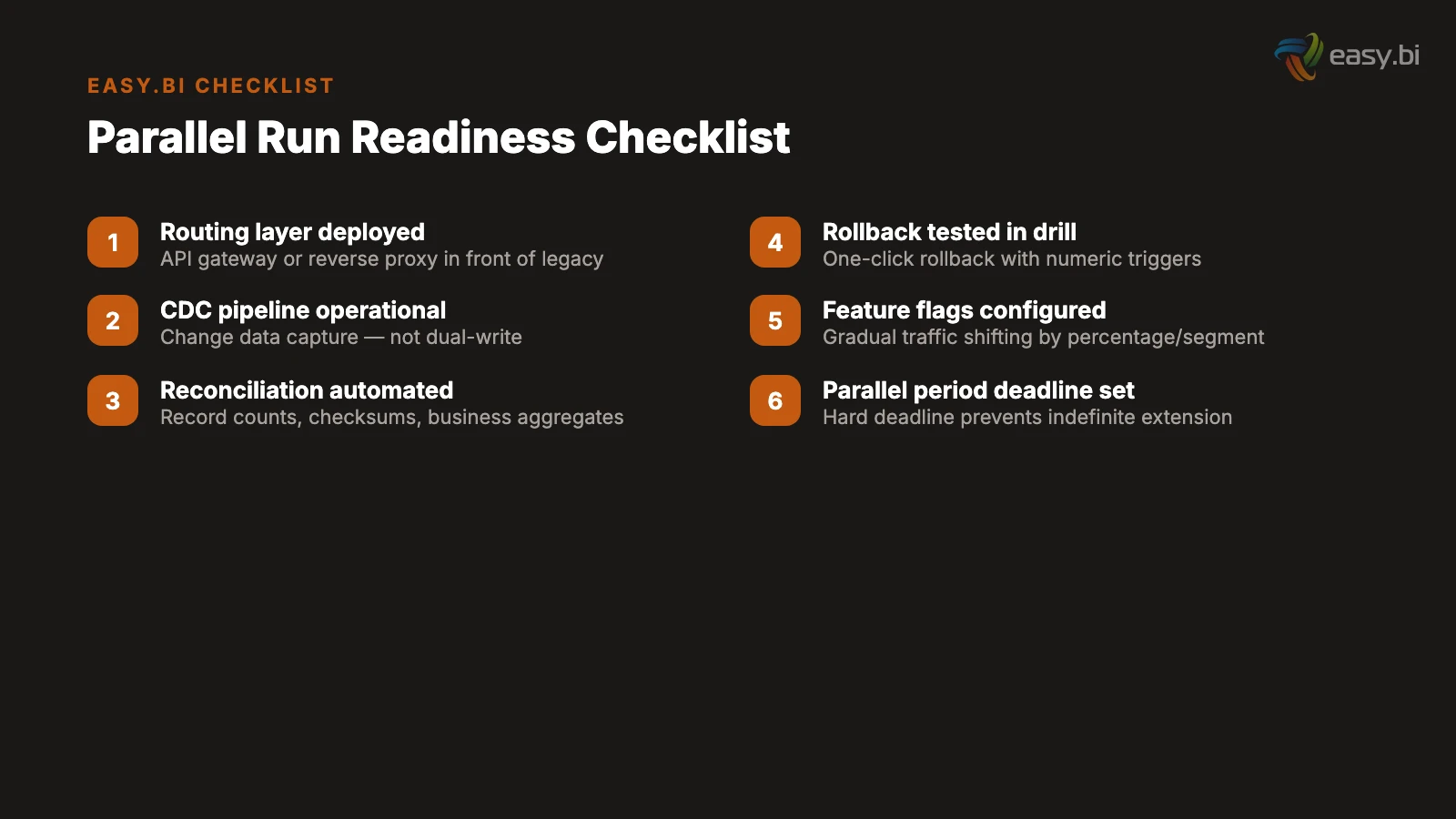
Change data capture is the correct approach. Change data capture (CDC) reads changes from the source database's transaction log and streams them to the target system. Because CDC reads from the transaction log rather than the application layer, it captures every change - including those made by batch jobs, manual database updates, and other systems that write to the database directly.[8]
CDC provides three guarantees that dual-write cannot: completeness (every change is captured), ordering (changes arrive in the same order they occurred), and exactly-once delivery (with the right CDC platform). These guarantees make CDC the de facto method for zero-downtime database migration.[9]
Automated reconciliation is essential. Even with CDC, data drift can occur - schema differences, transformation errors, edge cases in the CDC pipeline. Run automated reconciliation jobs on every synchronization cycle that compare record counts, checksums of key fields, and business-critical aggregates (total inventory, open orders, account balances) between the two systems. Set alert thresholds: a drift of 0.01% triggers an investigation; a drift of 0.1% triggers a pause in migration activities until the root cause is identified and resolved.
Define the source of truth explicitly. During the parallel period, one system must be the authoritative source for each data domain. If the legacy system is the source of truth for inventory data, then the new system reads inventory from the legacy system via CDC. If the new system is the source of truth for customer profiles (because that module has already migrated), then the legacy system reads customer data from the new system. A data domain ownership map - specifying which system owns which data at each phase of the migration - prevents the ambiguity that leads to conflicting updates.
What Is the Right Parallel Period Length?
The parallel period - the time both systems run in production simultaneously - is a balancing act. Too short and you cut over before edge cases have surfaced. Too long and you are paying double operational costs while the team's attention fractures between two codebases.
The right length depends on system criticality.
Non-critical internal tools: 2 to 4 weeks. Low user count, limited data complexity, minimal integration surface. A 2-week parallel period provides enough time for users to exercise the primary workflows while the team monitors for discrepancies. Rollback impact is limited to internal productivity.
Business-critical systems (ERP, CRM, WMS): 4 to 8 weeks. Higher user count, complex business logic, multiple integration endpoints. The parallel period must cover at least one full business cycle - monthly close, inventory reconciliation, reporting period - to ensure the new system handles cyclical processes correctly. The average developer spends 41% of their time on maintenance and technical debt,[10] and maintaining two systems simultaneously pushes that percentage even higher. Keep the parallel period as short as the data allows.
Revenue-critical systems (payment processing, order management): 8 to 16 weeks. Financial data requires extended validation. The parallel period must cover multiple business cycles, edge-case scenarios (refunds, chargebacks, partial shipments, returns), and reconciliation against external systems (banks, payment processors, tax authorities). Unplanned IT downtime costs enterprises approximately EUR 23,750 per minute.[1] The cost of an extended parallel period is trivial compared to the cost of a premature cutover that disrupts revenue-critical operations.
Set a hard deadline for the parallel period before it starts. Without a deadline, the parallel run extends indefinitely because there is always one more edge case to verify, one more reconciliation to run, one more stakeholder to convince. The deadline creates the urgency needed to resolve issues rather than defer them.
50+ custom projects. 99.9% uptime. 60% faster.
Senior-only engineering teams deliver production-grade platforms in under 4 months. No juniors on your project.
Start with a Strategy CallHow Do You Build a Rollback Strategy That People Trust?
The fear factor in legacy migration is real. Operations teams have seen failed cutovers. They have worked the 2 AM incident calls. They have experienced the chaos of a rolled-back deployment that left data in an inconsistent state. Telling them "it will be fine" is not a rollback strategy. A rollback strategy they trust has four components.
Numeric rollback triggers. Define the specific metrics that trigger an automatic rollback, with exact thresholds. Error rate above 0.5% for more than 5 minutes: rollback. Response time above 2x the legacy system baseline for more than 10 minutes: rollback. Data reconciliation drift above 0.1%: rollback. Business metric (orders processed, revenue recorded) below 95% of expected volume: rollback. These triggers are not suggestions. They are automated responses that execute without waiting for a human decision.
One-click rollback mechanism. The operations team must be able to trigger a rollback with a single action: a button in the deployment dashboard, a CLI command, a feature flag toggle. The rollback must not require an engineer to be present. It must not require a deployment pipeline. It must execute in seconds, not minutes. Every layer of complexity between the operator and the rollback button is a layer of risk during a crisis.
Rollback drills. Run a rollback drill before the parallel period begins. Simulate a failure in the new system. Trigger the rollback. Verify that traffic routes back to the legacy system. Verify that data remains consistent. Measure the rollback duration. If the drill reveals problems, fix them before starting the parallel run. Organizations that practice incident response reduce mean time to recovery by 50% or more compared to those that rely on ad-hoc responses.
Data rollback procedures. Traffic rollback (routing requests to the legacy system) is straightforward. Data rollback (ensuring the legacy system has all changes made during the period the new system handled traffic) is harder. If the new system was the source of truth for any data domain during the parallel period, the rollback procedure must include reverse replication of changes back to the legacy system. Document and test this procedure explicitly.
"A rollback strategy is not a safety net for the system. It is a safety net for the people. When the operations team knows they can undo the migration in 30 seconds, their anxiety drops and their willingness to proceed increases. The rollback strategy is as much a change management tool as it is a technical one."
What Does the Phase-by-Phase Timeline Look Like?
A complete parallel-run migration for a business-critical system follows a six-phase timeline. The phases are sequential, each gated by explicit completion criteria.
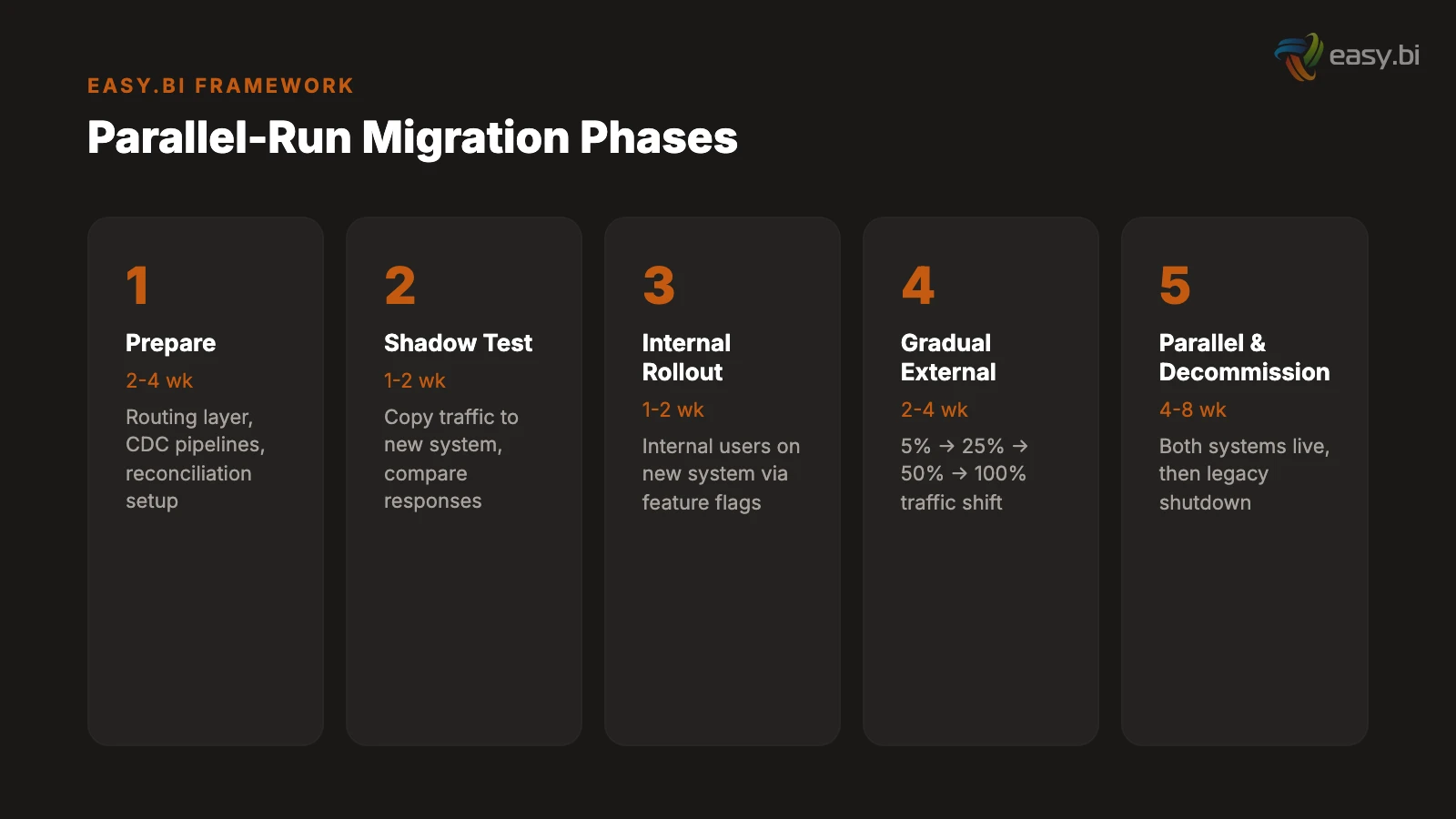
Phase 1: Preparation (2 to 4 weeks). Deploy the routing layer. Set up CDC pipelines. Build the reconciliation framework. Configure feature flags. Deploy the new system to production infrastructure without serving traffic. Run performance tests to validate that the new system handles expected load. Completion criteria: routing layer operational, CDC pipeline delivering data with sub-second latency, reconciliation reports showing 100% consistency on initial data load.
Phase 2: Shadow testing (1 to 2 weeks). Route a copy of production traffic to the new system without serving responses to users. Compare new system responses against legacy system responses for every request. Identify and resolve discrepancies. Completion criteria: response discrepancy rate below 0.5% for 7 consecutive days.
Phase 3: Internal rollout (1 to 2 weeks). Route internal users to the new system via feature flags. Internal users perform their normal workflows on the new system while the legacy system remains available for immediate rollback. Completion criteria: zero P1 incidents for 7 consecutive days, internal user acceptance sign-off.
Phase 4: Gradual external rollout (2 to 4 weeks). Increase external traffic from 5% to 25% to 50% to 100% over multiple weeks. At each increment, hold for a minimum of 5 business days before increasing. Monitor error rates, response times, data reconciliation, and business metrics. Completion criteria: 100% of traffic on the new system with all metrics within defined thresholds for 10 consecutive business days.
Phase 5: Parallel period (4 to 8 weeks for business-critical). Both systems run in production. The new system handles all traffic. The legacy system remains operational and receives data via reverse CDC (if needed for rollback). Reconciliation runs continuously. The team resolves any discrepancies as P1 issues. Completion criteria: zero data discrepancies above 0.01% for the full parallel period, zero rollback triggers activated.
Phase 6: Legacy decommission (1 to 2 weeks). Stop the CDC pipeline. Archive the legacy database. Shut down legacy infrastructure. Update DNS records, documentation, and monitoring dashboards. This phase is irreversible - once legacy infrastructure is decommissioned, rollback requires a full restore from backup. Do not enter this phase unless Phase 5 completion criteria are met without exception.
| Phase | Duration | Key Activity | Gate Criteria |
|---|---|---|---|
| 1. Preparation | 2-4 weeks | Infrastructure, CDC, reconciliation setup | 100% initial data consistency |
| 2. Shadow testing | 1-2 weeks | Compare responses without serving users | Discrepancy rate below 0.5% for 7 days |
| 3. Internal rollout | 1-2 weeks | Internal users on new system | Zero P1 incidents for 7 days |
| 4. Gradual external rollout | 2-4 weeks | 5% to 100% traffic shift | All metrics within thresholds for 10 days |
| 5. Parallel period | 4-8 weeks | Full production on new system, legacy standby | Zero discrepancies above 0.01% |
| 6. Legacy decommission | 1-2 weeks | Archive, shutdown, cleanup | Phase 5 criteria met without exception |
How Do You Address the Fear Factor?
The technical playbook is the easier half. The harder half is managing the organizational fear that accompanies any legacy migration. Operations teams, finance teams, and executives have legitimate concerns. Addressing those concerns directly - with evidence, not reassurance - is what separates migrations that succeed from migrations that stall in the parallel phase indefinitely.
"What if the new system fails?" Answer: The legacy system continues to run throughout the parallel period. Rollback executes in seconds via feature flag toggle. The rollback has been tested in a drill before the parallel run began. The team has numeric triggers that automatically activate rollback before humans even notice the problem. The new system must prove itself over weeks of parallel production before the legacy system is decommissioned.
"What if we lose data?" Answer: CDC captures every change from the source database transaction log. Automated reconciliation runs on every cycle, comparing record counts, checksums, and business aggregates. A drift of 0.01% triggers an investigation. A drift of 0.1% triggers a pause. The legacy database is not deleted until the parallel period is complete and all data integrity checks pass.
"What if it takes too long?" Answer: The parallel period has a hard deadline set before it begins. The incremental migration approach delivers value continuously - the team is not waiting months for a single cutover. Each phase has explicit gate criteria. If a phase does not meet its criteria, the team addresses the root cause rather than extending the timeline. Migration failure statistics show that 61% of projects that exceed timelines do so because they lacked explicit phase gates.[1]
"What about the cost of running two systems?" Answer: Yes, the parallel period increases operational costs by 30 to 50%.[3] That premium is insurance against the alternative: a failed big-bang cutover that costs the entire project budget. Frame the parallel period cost as a known, bounded investment rather than an open-ended expense. The hard deadline ensures the parallel costs do not spiral.
The organizations that execute parallel runs successfully are the ones that treat migration as a change management challenge, not just a technical one. The CTO can build the perfect CDC pipeline, but if the operations team does not trust the rollback mechanism, they will find reasons to delay the cutover indefinitely.
For a deeper understanding of why legacy systems accumulate the complexity that makes migration necessary, see our analysis of hidden costs of legacy systems. For the delivery methodology that keeps incremental migration on track, our guide on 14-day sprint delivery covers the cadence that makes parallel runs manageable. And if you are evaluating whether to migrate incrementally or attempt a full rebuild, our custom software development framework provides the decision criteria.
References
- [1] nCube / Cloudficient (2025). ncube.com
- [2] AltexSoft / Lightbend (2025). altexsoft.com
- [3] Devox Software (2025). devoxsoftware.com
- [4] McKinsey / Oxford University (2023). mckinsey.com
- [5] Microsoft Azure Architecture Center (2025). microsoft.com
- [6] Hokstad Consulting / Flagsmith (2025). hokstadconsulting.com
- [7] Thorben Janssen (2024). thorben-janssen.com
- [8] Confluent (2025). "CDC reads changes from the database transaction log and strea confluent.io
- [9] LegacyLeap / Capital One (2025). legacyleap.ai
- [10] Stripe (2023). "The average developer spends 41% of their time on maintenance an
Explore Other Topics
Ready to build your custom platform?
30-minute call with an engineering lead. No sales pitch - just honest answers about your project.
98% engineer retention · 14-day delivery sprints · No lock-in contracts
Related Reading

The True Cost of Legacy Systems: What Your CFO Isn't Tracking
Legacy systems cost 3-5x more than their replacement when you factor in lost productivity, talent attrition, and missed market opportunities. Here's the full picture.
Andrej Lovsin
Design Systems for Enterprise: Siemens Case Study
Design systems reduce development time by 25-50% and accelerate time-to-market by 47%. Learn how Siemens built a unified UI library with Angular, Storybook, and Figma - and the governance model that made it stick.
Timo Koerner
How can travel companies gain from upgrading their IT systems?
Modernizing IT in travel enhances customer experience, streamlines operations, reduces costs, and maintains competitiveness in the industry.
Enno Bassen