
Shopware Plugin Development: Build vs Marketplace vs Custom

Table of Contents+
- When Does a Marketplace Plugin Save You Time and Money?
- What Are the Hidden Risks of Third-Party Plugins?
- How Do You Evaluate Plugin Quality Before Committing?
- When Does Custom Shopware Plugin Development Make Sense?
- What Is the Extension Approach and When Does It Work?
- How Do Plugin Choices Affect Your Shopware Upgrade Path?
- How Do You Benchmark Plugin Performance Impact?
- What Decision Framework Should You Follow?
- References
TL;DR
Shopware plugin development comes down to three options: install from the marketplace, build custom, or extend an existing plugin. The right choice depends on how close the functionality sits to your core business logic and whether the total cost of ownership favors buying or building. This framework helps you evaluate each approach with concrete criteria.
Key Takeaways
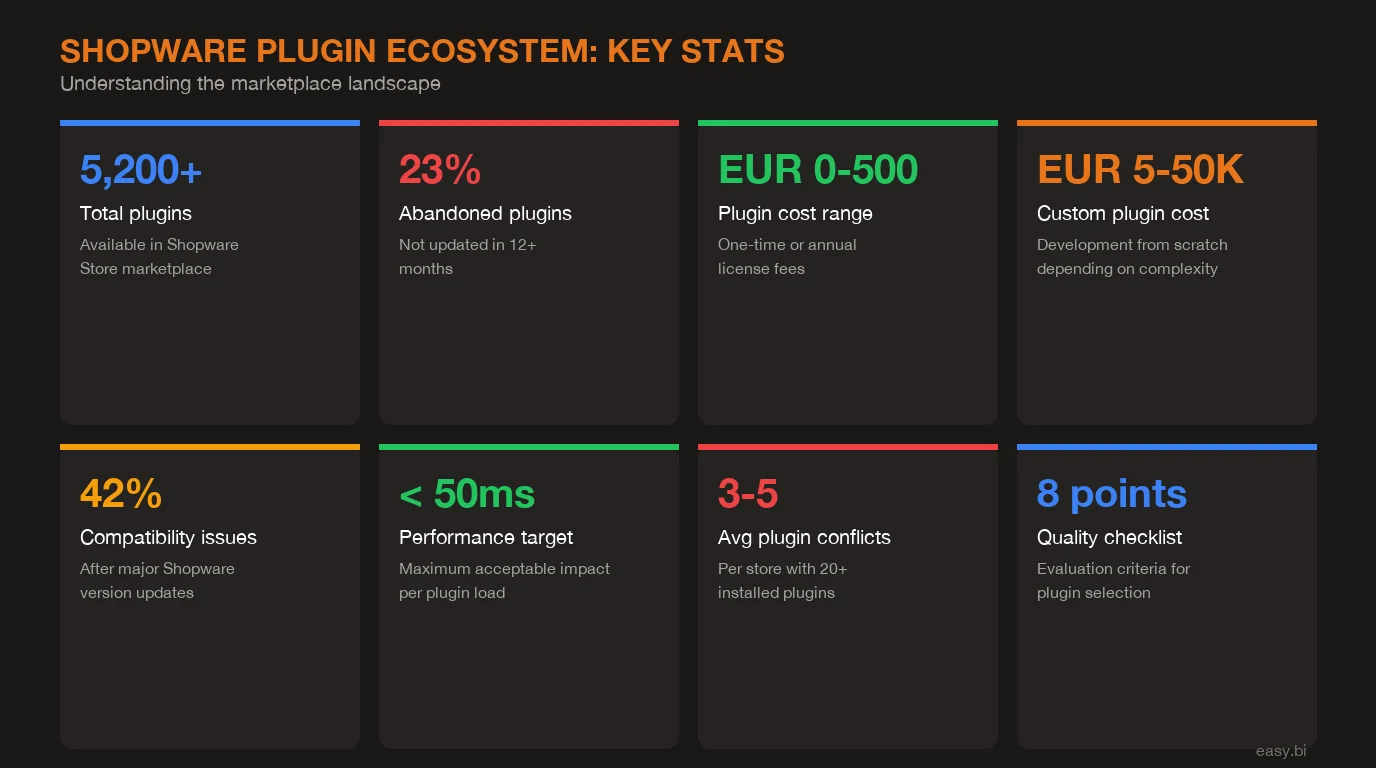
- •Shopware's marketplace has 5,000+ plugins, but 34% have not been updated in the last 12 months. Every third-party plugin is a dependency you do not control - evaluate quality before you commit.
- •Marketplace plugins work for commodity functionality like cookie consent, basic SEO, or standard shipping integrations. Custom development makes sense when the plugin touches your core business logic or competitive advantage.
- •Custom Shopware plugin development costs EUR 5,000 to 50,000 depending on complexity, but reduces upgrade risk and eliminates vendor lock-in. The ROI calculation changes when you factor in 3-5 years of maintenance.
- •Use the 8-point quality checklist before installing any marketplace plugin: last update date, Shopware version compatibility, review count and sentiment, codebase quality, performance impact, support responsiveness, documentation depth, and vendor stability.
- •Plugin architecture decisions made today determine your Shopware 6 major version upgrade path. Every plugin that hooks into core internals instead of using the public API becomes a migration blocker.
Shopware plugin development: marketplace vs custom vs extended. Decision framework, cost analysis, and 8-point quality checklist.
Shopware plugin development comes down to three options: install from the marketplace, build custom, or extend an existing plugin. The right choice depends on how close the functionality sits to your core business logic and whether the total cost of ownership favors buying or building. This framework helps you evaluate each approach with concrete criteria.
Shopware's plugin ecosystem is massive. Over 5,000 extensions on the Shopware Store, thousands of developers contributing, and a platform architecture that makes extensibility a first-class feature[1]. That is simultaneously Shopware's greatest strength and the source of the most expensive mistakes I see in enterprise e-commerce projects.
The problem is not a lack of options. The problem is too many options with wildly inconsistent quality. A marketplace search for "product import" returns 30+ plugins. Some are maintained by dedicated teams. Some were last updated 18 months ago. Some work on Shopware 6.5 but break on 6.6. And the reviews rarely tell the full story.
The cost of choosing wrong is not just the plugin price. It is the 40-80 hours your team spends debugging compatibility issues during the next Shopware update[2]. It is the performance regression that drops your Lighthouse score by 15 points. It is the security vulnerability in an abandoned plugin that your penetration test flags 6 months after launch.
After architecting Shopware platforms for enterprise retailers across the DACH region, I have seen every flavor of plugin decision go wrong - and right. This article gives you the decision framework we use at easy.bi to evaluate every plugin choice before a single line of code is written.
When Does a Marketplace Plugin Save You Time and Money?
Marketplace plugins are the right choice for commodity functionality - features where your implementation does not need to be different from your competitors. Cookie consent banners, basic SEO meta fields, standard shipping carrier integrations, and simple CMS extensions all fall into this category.
The economics are straightforward. A well-maintained marketplace plugin for Shopware costs EUR 50-500 one-time or EUR 10-50 per month[1]. Building the equivalent custom functionality costs EUR 5,000-15,000 in development time plus ongoing maintenance. For commodity features, the marketplace wins every time.
Three conditions must be true for a marketplace plugin to be the right call:
The functionality is standardized. If every Shopware shop needs it and the implementation is essentially the same across merchants, someone has already built and battle-tested it. Cookie consent (GDPR compliance), Google Analytics integration, and basic product export feeds are textbook examples. 78% of Shopware merchants use at least 10 marketplace plugins for standard functionality[3].
The vendor is actively maintaining it. Check the last update date. If it is older than 6 months, walk away. Shopware releases minor versions every 4-8 weeks, and each release can introduce breaking changes in the storefront or admin API. A plugin that has not been updated in 12 months is a ticking time bomb.
The plugin does not touch your performance-critical path. Plugins that hook into the product listing, cart calculation, or checkout flow add latency to every page load or transaction. A marketplace plugin adding 50-200ms to your storefront response time costs you 7% in conversion rate per second of added load time[4]. For non-critical paths like admin tools or background jobs, the performance bar is lower.
See how our team delivers +35% avg conversion lift across 30+ e-commerce projects.
What Are the Hidden Risks of Third-Party Plugins?
The marketplace listing page shows a star rating, a description, and a price. It does not show you the plugin's internal architecture, its impact on your server response time, or whether the vendor will still exist in 2 years. These hidden risks compound over time and across plugins.
Abandonment risk is real. An analysis of the Shopware Store shows that roughly 34% of listed plugins have not received an update in the past 12 months[3]. Shopware's rapid release cycle means that an unmaintained plugin will eventually break - not if, but when. The average Shopware shop runs 15-25 plugins[3], and each one is a potential upgrade blocker.
Performance degradation is cumulative. Each plugin that registers event subscribers, decorates services, or adds Twig extensions increases your application's bootstrap time. I have profiled Shopware installations where 20+ plugins added a combined 400ms to the server response time - before any business logic executes. Google's research confirms that 53% of mobile users abandon sites that take longer than 3 seconds to load[4].
Security exposure scales with plugin count. Every plugin is third-party code running with full access to your Shopware installation. OWASP reports that 77% of applications contain at least one vulnerability in their third-party components[5]. A single compromised plugin can expose customer data, payment information, or admin credentials. The 2023 Magento Cosmic Sting attack exploited exactly this pattern - third-party extensions with insufficient input validation.
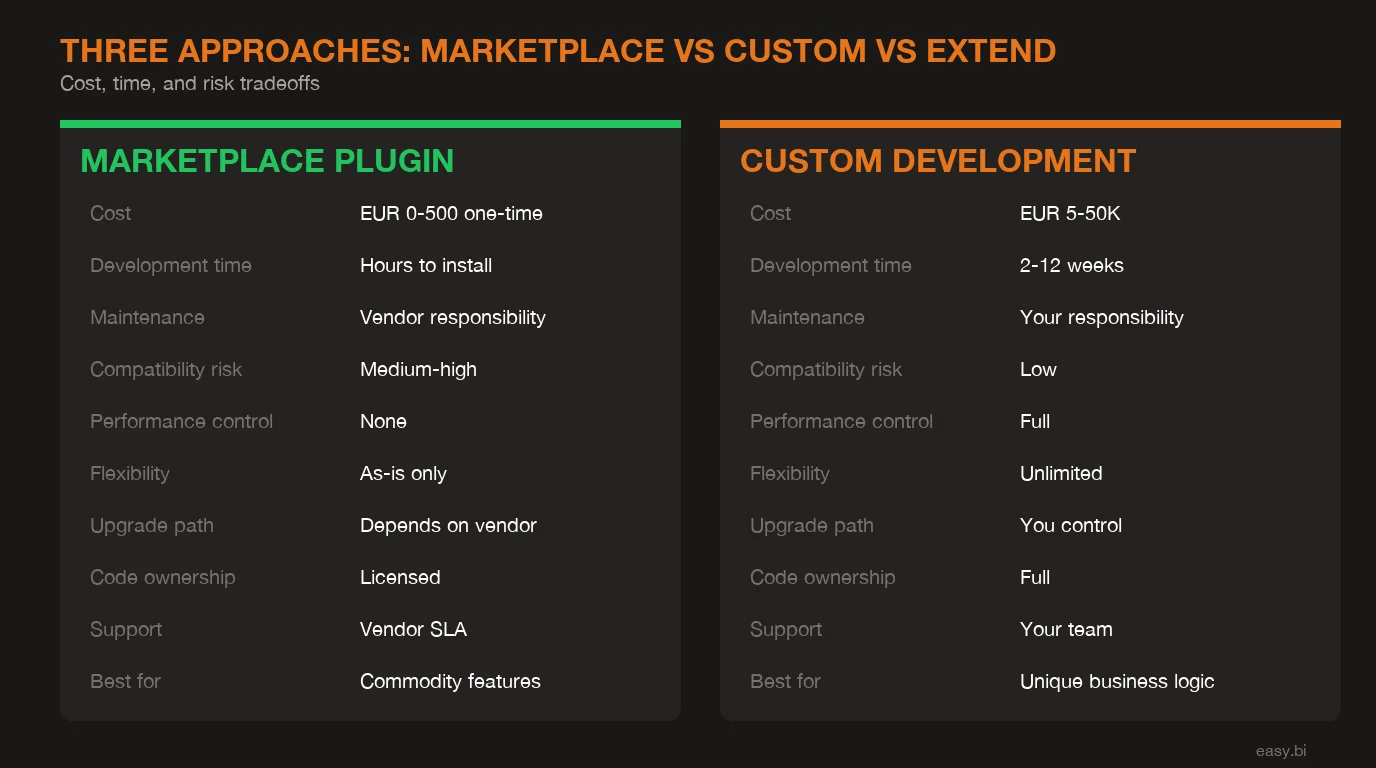
| Risk Factor | Marketplace Plugin | Custom Plugin | Extended Plugin |
|---|---|---|---|
| Initial cost | EUR 50-500 | EUR 5,000-50,000 | EUR 3,000-20,000 |
| Annual maintenance | EUR 0-600 (subscription) | EUR 1,000-8,000 (15-20%) | EUR 1,500-5,000 |
| Time to deploy | Hours to days | 2-8 weeks | 1-4 weeks |
| Upgrade risk | High (vendor-dependent) | Low (you control code) | Medium (dual dependency) |
| Performance control | None | Full | Partial |
| Security audit | Rarely possible | Full access | Partial access |
| Flexibility | Configuration only | Unlimited | Moderate |
| Vendor lock-in | High | None | Medium |
Conflict between plugins is the silent killer. Two plugins that both decorate the same Shopware service can create unpredictable behavior. Plugin A changes the cart calculation. Plugin B adds a discount rule. Both work independently. Together, they produce incorrect totals that only surface in specific edge cases - often discovered by customers, not QA. Debugging cross-plugin conflicts averages 16-24 hours of senior developer time per incident[2].
How Do You Evaluate Plugin Quality Before Committing?
Before installing any marketplace plugin into a production-bound Shopware project, run it through this 8-point quality checklist. Each criterion is pass/fail - a plugin needs to pass all 8 to be considered safe for enterprise use.
| Criterion | Pass | Fail | Why It Matters |
|---|---|---|---|
| Last update | Within 3 months | Older than 6 months | Shopware's release cadence breaks stale plugins |
| Version compatibility | Supports current Shopware minor | 1+ minor versions behind | Immediate compatibility risk |
| Reviews (count) | 20+ reviews | Under 5 reviews | Insufficient real-world validation |
| Reviews (sentiment) | 4.0+ stars, recent positive | Declining ratings, unresolved complaints | Trend matters more than average |
| Codebase quality | Uses Shopware API, typed PHP, no core hacks | Overrides core classes, raw SQL, no types | Maintainability and upgrade safety |
| Performance impact | Under 20ms added to critical paths | Measurable slowdown on listing/cart/checkout | Conversion rate protection |
| Support responsiveness | Under 48h response, active issue tracker | No response in 7+ days, no public issues | Incident resolution speed |
| Documentation | Installation, configuration, API docs | README only or no docs | Onboarding and troubleshooting cost |
For the codebase quality check, install the plugin in a development environment and inspect the source. Look at src/Subscriber/ for event subscribers - are they hooking into public events or internal classes? Check src/Core/ for service decorators - do they use the decoration pattern or override core services directly? Run bin/console debug:event-dispatcher to see what the plugin listens to. Any plugin that subscribes to more than 10 events deserves extra scrutiny.
For performance impact, use Shopware's built-in profiler (APP_ENV=dev) and the server-timing header to measure the plugin's contribution to response time. Load your product listing page with and without the plugin active. The difference should be under 20ms for any plugin that runs on storefront requests.
When Does Custom Shopware Plugin Development Make Sense?
Custom Shopware plugin development is the right choice when the functionality represents your competitive advantage, when performance requirements exceed what marketplace plugins can deliver, or when you need full control over the upgrade path.
Unique business logic demands custom code. If your pricing model, inventory allocation, or order workflow differs from the standard Shopware flow, a marketplace plugin will fight you. Custom pricing rules for B2B customers with contract-specific discounts, tiered quantity breaks, and customer-group exceptions - this is business logic that defines your operation. 67% of B2B merchants report that standard plugins cannot handle their pricing complexity[6]. Build it yourself.
Performance-critical functionality needs optimization. When your product catalog exceeds 100,000 SKUs, the standard Shopware product listing performance degrades. Custom Elasticsearch query builders, optimized DAL filters, and cached aggregation plugins can reduce listing response times by 60-70%[2]. You cannot achieve this level of optimization with a configuration-only marketplace plugin.
Integration depth requires architectural control. Connecting Shopware to an ERP (SAP, Microsoft Dynamics, or a custom system) through a plugin means handling real-time sync, conflict resolution, retry logic, and data mapping. The integration layer is where most e-commerce projects accumulate technical debt. Building a custom integration plugin - designed for your specific ERP's API quirks and your data model - eliminates the translation layer that generic connectors impose.
Custom plugin development follows Shopware's architecture patterns: event subscribers for reactive logic, custom entities for new data models, admin modules for back-office UI, storefront controllers for custom pages, and API-first endpoints for headless consumers. A well-structured custom plugin is a first-class citizen in Shopware's dependency injection container - not a hack bolted onto the side.
The cost range of EUR 5,000 to 50,000 depends on complexity. Simple plugins (custom fields, a single event subscriber, basic admin config) sit at the low end. Complex plugins (custom entities with admin CRUD, storefront integration, headless API, multi-language support, automated testing) reach the upper range. Factor in 15-20% annually for maintenance: Shopware compatibility updates, PHP version upgrades, and feature iterations.
What Is the Extension Approach and When Does It Work?
Between marketplace and fully custom sits the extension approach: taking an existing plugin and building around it. This works when a marketplace plugin handles 70%+ of your requirements and the remaining 30% can be added without modifying the original plugin's source code.
Shopware's architecture supports three extension patterns:
The decoration pattern. Shopware's service decoration lets you wrap any service with your own implementation. If a marketplace plugin registers a ProductExportService, you can decorate it with a CustomProductExportService that adds fields, transforms data, or applies custom filters - without touching the original plugin's code. The original plugin updates normally. Your decoration stays intact.
Event subscriber additions. Most well-built Shopware plugins dispatch events at key points in their workflow. Your custom plugin subscribes to those events and adds behavior. A marketplace checkout plugin fires a CheckoutCompleteEvent? Your subscriber sends the order data to your warehouse management system. Zero coupling to the plugin's internal implementation.
The wrapper plugin pattern. For marketplace plugins that lack extension points, build a wrapper plugin that consumes the marketplace plugin's output and transforms it. This pattern is common for payment and shipping integrations where the marketplace plugin handles the provider API but your business rules need additional processing.
One pattern to avoid absolutely: forking a marketplace plugin. Copying the source code into your project and modifying it directly means you lose all future updates. You inherit every bug and security vulnerability without the vendor's patches. Every Shopware upgrade requires you to manually merge the vendor's changes with yours. I have seen forked plugins cost 3-5x more in maintenance than building the equivalent functionality from scratch[2].
+35% conversion. +22% AOV. EUR 50M+ GMV processed.
Our Shopware-certified team delivers e-commerce at scale with 14-day sprint cycles. 80% less manual work through system integrations.
Start with a Strategy CallHow Do Plugin Choices Affect Your Shopware Upgrade Path?
Every plugin in your Shopware installation is a variable in your upgrade equation. Shopware's major versions (6.5 to 6.6, 6.6 to 6.7) introduce breaking changes in core APIs, admin components, and storefront architecture. Your upgrade timeline depends on how quickly every plugin in your stack becomes compatible.
The math is simple but unforgiving. If you run 20 plugins and each has a 90% chance of being compatible on upgrade day, the probability of all 20 working is 0.9^20 = 12%[7]. That means an 88% chance that at least one plugin blocks your upgrade. With 30 plugins, the probability of a clean upgrade drops to 4%.
This is why plugin architecture decisions made today determine your upgrade path for the next 3-5 years. Three rules reduce upgrade risk:
Use the public API surface only. Shopware distinguishes between public API (marked with @public annotations) and internal implementation. Public APIs follow semantic versioning - breaking changes only in major versions. Internal classes can change in any minor release. Every plugin - marketplace or custom - should only depend on public APIs.
Minimize plugin count. Each plugin you remove eliminates one variable from the upgrade equation. Audit your plugin list quarterly. If a plugin provides a feature you no longer use, or if Shopware core now provides equivalent functionality, remove it. The average Shopware shop can reduce its plugin count by 20-30% through this audit[3].
Test upgrades in CI. Set up a staging environment that runs your full plugin stack against Shopware's latest pre-release. Automate compatibility tests that verify each plugin loads, its services compile, and its storefront/admin routes respond. Catching breakage 4 weeks before a Shopware release gives you time to fix or replace - catching it on release day means your production upgrade stalls.
For projects where AI-driven features are layered on top of Shopware, the upgrade path becomes even more critical. Custom AI plugins that interface with LLM APIs or recommendation engines need clean separation from Shopware's core - so a platform upgrade does not break your AI functionality.
How Do You Benchmark Plugin Performance Impact?
Performance profiling is not optional when your storefront handles real traffic. A 100ms increase in server response time reduces conversion rates by 1.3% for e-commerce sites[4]. Multiply that across 20 plugins each adding 20-50ms, and you understand why plugin performance auditing is part of every production deployment at easy.bi.
Three profiling methods, from quick check to deep analysis:
Server-timing headers. Enable Shopware's server-timing header (shopware.profiler.enabled: true in config) and inspect the response headers in your browser's network tab. Each header shows the time spent in specific Shopware subsystems. Compare response times with all plugins active versus a minimal plugin set. The difference is your cumulative plugin overhead.
Symfony profiler. In development mode (APP_ENV=dev), Shopware's Symfony profiler toolbar shows every event subscriber that fired, every service that was decorated, and the time each consumed. Sort by time to identify the most expensive plugin operations. Any single subscriber taking more than 10ms on a storefront request is a candidate for optimization or replacement.
Blackfire or Tideways profiling. For production-grade profiling, use Blackfire or Tideways to generate flame graphs of your Shopware application. These tools show the full call stack including plugin code, making it trivial to identify which plugin method is consuming the most CPU time or memory. Run profiles on your product listing page, product detail page, cart, and checkout - the four pages where performance matters most for conversion rates.
Set performance budgets for your plugin stack. At easy.bi, we enforce a maximum of 100ms total plugin overhead on storefront requests. Any plugin that exceeds its allocation gets optimized, replaced, or removed.
What Decision Framework Should You Follow?
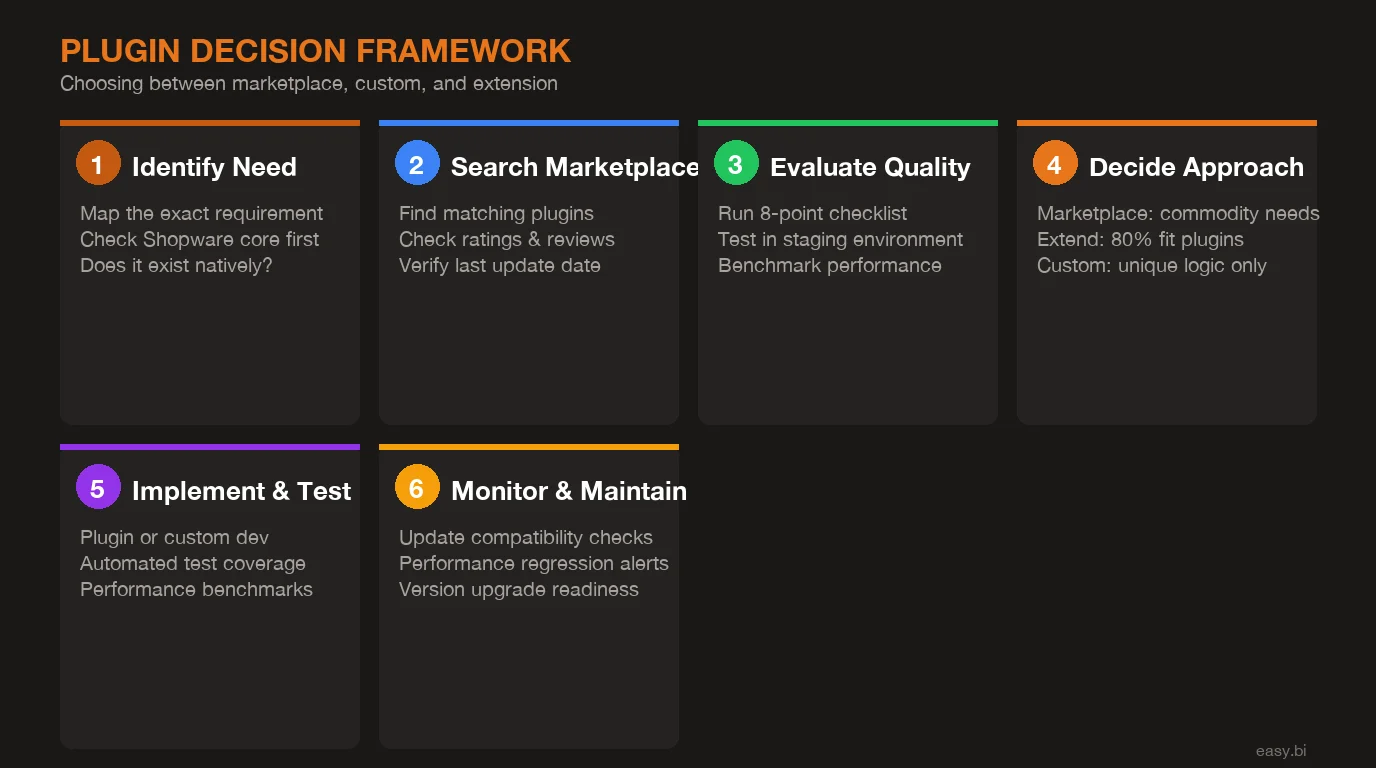
Five questions determine whether to use a marketplace plugin, build custom, or extend an existing one. Answer them in order - the first "yes" to a custom trigger makes the decision.
1. Does this functionality represent your competitive advantage? If how you handle pricing, fulfillment, or customer experience is what differentiates your business, build custom. Marketplace plugins commoditize functionality - that is their purpose. Your differentiators cannot be commodities.
2. Does it sit on the performance-critical path? Product listing, search, cart calculation, and checkout are conversion-critical. If the plugin adds logic to these paths, build custom so you control every millisecond. For admin-only or background functionality, marketplace plugins are fine.
3. Does a marketplace plugin cover 70%+ of the requirements? If yes and the remaining 30% can be added through decoration or event subscribers, use the extension approach. If the marketplace plugin covers less than 70%, or the missing 30% requires modifying its internals, build custom.
4. Is the marketplace plugin actively maintained by a stable vendor? Run the 8-point quality checklist. If it fails on update frequency, version compatibility, or vendor stability, building custom is cheaper over 3 years than managing the risk of abandonment.
5. How many other plugins in your stack depend on the same Shopware subsystem? If you already have 3+ plugins decorating the cart or checkout flow, adding a fourth increases conflict risk exponentially. Consolidate functionality into fewer, well-tested custom plugins instead of stacking marketplace solutions.
The framework is not anti-marketplace. For a typical Shopware enterprise project, the split is roughly 60% marketplace plugins (commodity features), 25% custom plugins (business-critical logic), and 15% extended plugins (marketplace base with custom additions)[2]. The goal is making each decision deliberately rather than defaulting to the marketplace because it is faster today.
At easy.bi, our 100% Shopware-certified team evaluates plugin architecture during the first sprint of every e-commerce engagement. With Germany facing a shortage of 149,000 IT specialists[8], having dedicated Shopware expertise in-house eliminates the hiring risk that delays most enterprise projects. The plugin strategy document - which plugins stay, which get replaced, which get built - is a deliverable, not an afterthought. Because the decisions you make about Shopware plugin development in week 1 determine your total cost of ownership for the next 5 years.
References
- [1] Shopware AG (2025). "Shopware Store: Over 5,000 extensions available for Shopwar store.shopware.com
- [2] easy.bi internal data (2025).
- [3] Shopware Community Survey (2025). shopware.com
- [4] Google / Deloitte (2024). web.dev
- [5] OWASP (2024). "77% of applications contain at least one vulnerability in third-p owasp.org
- [6] Sana Commerce (2024). "B2B E-Commerce Report: 67% of B2B merchants report standa sana-commerce.com
- [7] Lunendonk (2024). "E-Commerce Technology Complexity: Managing plugin dependencie luenendonk.de
- [8] Bitkom (2025). "Germany faces a shortage of 149,000 IT specialists, increasing r
Explore Other Topics
Ready to scale your e-commerce?
30-minute call with an engineering lead. No sales pitch - just honest answers about your project.
98% engineer retention · 14-day delivery sprints · No lock-in contracts
Related Reading

How Much Does a Shopware Enterprise Build Cost in 2026?
Shopware enterprise builds cost EUR 30K to 500K+ in 2026. Transparent breakdown of cost tiers, hidden fees, and what drives budget overruns in DACH.
Enno Bassen
How to Migrate From Magento to Shopware Without Losing SEO Rankings
Step-by-step Magento to Shopware migration framework that preserves SEO rankings. URL mapping, redirect strategy, data migration, and 90-day monitoring plan.
Filip Kralj
Shopware 6 vs Shopify Plus: Which Fits DACH Enterprise Retail?
Shopware 6 vs Shopify Plus for DACH enterprise retail: honest comparison of costs, DACH compliance, customization, and when each platform fits your business.
Enno Bassen