
How to Run E-Commerce in 14-Day Sprints Without Breaking Production

Table of Contents+
- Why 14-Day Sprints Outperform Monthly Releases
- What Makes E-Commerce Sprints Different from Standard Software Sprints?
- How Feature Flags Change the Deployment Game
- Blue-Green Deployments: Zero-Downtime Releases for E-Commerce
- Sprint Planning for Retail: The REWE Cadence
- What Automated Testing Looks Like for Sprint E-Commerce
- How Do You Handle Hotfixes Between Sprints?
- What Results Does This Cadence Produce?
- References
TL;DR
Shipping e-commerce updates every 14 days without breaking production requires three things most teams lack: feature flags that decouple deployment from activation, blue-green environments that eliminate downtime risk, and sprint planning that respects retail calendars. Get those right, and you ship faster than competitors who deploy monthly.
Key Takeaways
- •14-day sprint cycles deliver 40% more features per quarter than 4-week cycles, but only when combined with automated deployment pipelines and feature flags.
- •Feature flags reduce deployment risk by 50% and let you decouple code deployment from feature activation - the single most important practice for continuous e-commerce delivery.
- •Blue-green deployments eliminate downtime during releases by running two identical production environments and switching traffic after validation.
- •Sprint planning for e-commerce must account for peak traffic windows, promotional calendars, and third-party integration freeze periods that traditional software sprints ignore.
- •The REWE delivery model proves that enterprise-scale e-commerce can ship production updates every 14 days with zero unplanned downtime when the right guardrails are in place.
14-day sprint delivery for e-commerce demands feature flags, blue-green deployments, and ruthless scope discipline. Here is how REWE-level teams ship every 2 weeks without downtime.
Shipping e-commerce updates every 14 days without breaking production requires three things most teams lack: feature flags that decouple deployment from activation, blue-green environments that eliminate downtime risk, and sprint planning that respects retail calendars. Get those right, and you ship faster than competitors who deploy monthly.
Get them wrong, and you create the kind of outage that costs six figures per hour.
The 14-day sprint is not a preference. It is the delivery cadence that produces the best outcomes in enterprise e-commerce. After running this model for REWE, Fressnapf, ZooRoyal, and dozens of mid-market DACH retailers, we have data on what makes it work and what breaks it.
Why 14-Day Sprints Outperform Monthly Releases
Projects using 2-week sprint cycles deliver 40% more features per quarter than those using 4-week cycles.[1] That statistic alone should settle the debate, but the reasons behind it matter more than the number itself.
Shorter cycles force smaller scope. Smaller scope means fewer dependencies, fewer merge conflicts, and fewer surprises during testing. When a sprint contains 3-5 well-defined work packages instead of 10-15 loosely scoped tasks, every team member knows exactly what they are building and why.
Shorter cycles also compress the feedback loop. A conversion rate change deployed on day 1 of a 4-week sprint sits unvalidated for a month. The same change in a 2-week sprint gets production data within days. You course-correct faster. You waste less time building on faulty assumptions.
There is a psychological factor too. Two-week cycles create a rhythm. The team knows that every other Friday, working software ships. That cadence builds momentum and accountability in ways that longer cycles cannot replicate.
Sprint retrospectives that lead to at least one process improvement per sprint increase team velocity by 18% over 6 months.[2]
See how our team delivers +35% avg conversion lift across 30+ e-commerce projects.
What Makes E-Commerce Sprints Different from Standard Software Sprints?
Standard agile advice assumes your deployment risk is roughly constant. In e-commerce, it is not. A broken checkout on a Tuesday in February is a problem. A broken checkout on Black Friday is a catastrophe. E-commerce sprints must account for realities that generic sprint frameworks ignore.
Peak traffic windows. Black Friday, Cyber Monday, Christmas, Easter - these are not just marketing events. They are code-freeze periods. You do not deploy a new checkout flow the week before Black Friday.
Smart teams lock their deployment calendar 2-3 weeks before peak events, which means the sprint planning 6 weeks before Black Friday already needs to account for the freeze.
Peak traffic windows
Promotional dependencies. Marketing runs promotions on fixed dates. If the campaign requires a new product badge, a countdown timer, or a free-shipping threshold change, the development sprint must complete and deploy before the campaign launch date. This requires cross-team sprint planning that aligns marketing timelines with engineering capacity.
Third-party integration windows. Payment providers, ERP systems, and shipping carriers have their own maintenance schedules and API update cycles. A PIM sync job that runs nightly cannot be interrupted by a mid-day deployment.
A payment provider API update scheduled for the same week as your sprint release doubles your testing surface. These dependencies must be mapped into the sprint backlog.
Promotional dependencies
The biggest sprint failures in e-commerce are not technical - they are calendar failures. The team builds the right thing at the wrong time, and a deployment collides with a promotion, a traffic peak, or a third-party maintenance window.
How Feature Flags Change the Deployment Game
Feature flags are the single most important practice for continuous e-commerce delivery. They let you deploy code to production without activating it for users. This separation between deployment and activation is what makes 14-day sprints safe for revenue-critical systems.
Feature flags reduce deployment risk by 50% and enable 10x more experiments per quarter.[3] Here is how they work in practice:
Deploy dark, activate light
Deploy dark, activate light. You merge a new checkout layout into the main branch, deploy it to production, but keep it hidden behind a flag. Only internal testers see it. Once validated, you activate the flag for 5% of users. Monitor error rates and conversion for 24 hours.
If metrics hold, roll to 25%, then 50%, then 100%. If something breaks, kill the flag. The old experience returns instantly - no rollback deployment needed.
Operational flags for peak protection. During Black Friday, you want the ability to disable non-essential features instantly. A new recommendation engine that adds 200ms of latency? Flag it off. A recently launched review widget causing JavaScript errors? Flag it off.
These operational flags are not about feature delivery - they are about revenue protection.
Per-market flags for multi-country shops. If you operate in DE, AT, and CH with different tax rules, shipping options, and payment methods, feature flags let you roll out changes market by market. Deploy the new SEPA integration in AT first, validate, then expand to DE.
This reduces blast radius and lets you fix market-specific bugs before they affect your largest market.
Blue-Green Deployments: Zero-Downtime Releases for E-Commerce
Blue-green deployment is a strategy where you maintain two identical production environments - blue (current) and green (next release). You deploy the new version to the green environment, run automated smoke tests against it, and then switch the load balancer to route traffic from blue to green.
If something goes wrong, you switch back to blue in seconds.
| Deployment Strategy | Downtime Risk | Rollback Time | Infrastructure Cost | Best For |
|---|---|---|---|---|
| Direct deployment | High | 10-30 min | Low | Dev/staging only |
| Rolling update | Low | 5-15 min | Medium | Stateless services |
| Blue-green | Near zero | Seconds | High (2x infra) | Revenue-critical e-commerce |
| Canary release | Near zero | Seconds | Medium-high | High-traffic gradual rollout |
The infrastructure cost of blue-green deployments is real - you are running two production environments. For a typical Shopware 6 setup with Kubernetes, this means doubling your compute nodes during deployment windows.
But for a shop doing EUR 50,000+ per day, 30 minutes of downtime costs more than a month of the extra infrastructure.
Elite DevOps performers deploy 973x more frequently than low performers, with a change failure rate of 0-5% compared to 46-60%.[4] Blue-green deployments are a key enabler of that performance gap. You cannot deploy frequently if every deployment carries downtime risk.
Sprint Planning for Retail: The REWE Cadence
The REWE delivery model is the benchmark we use for enterprise e-commerce sprint planning. Here is what that cadence looks like in practice, adapted for mid-market teams.
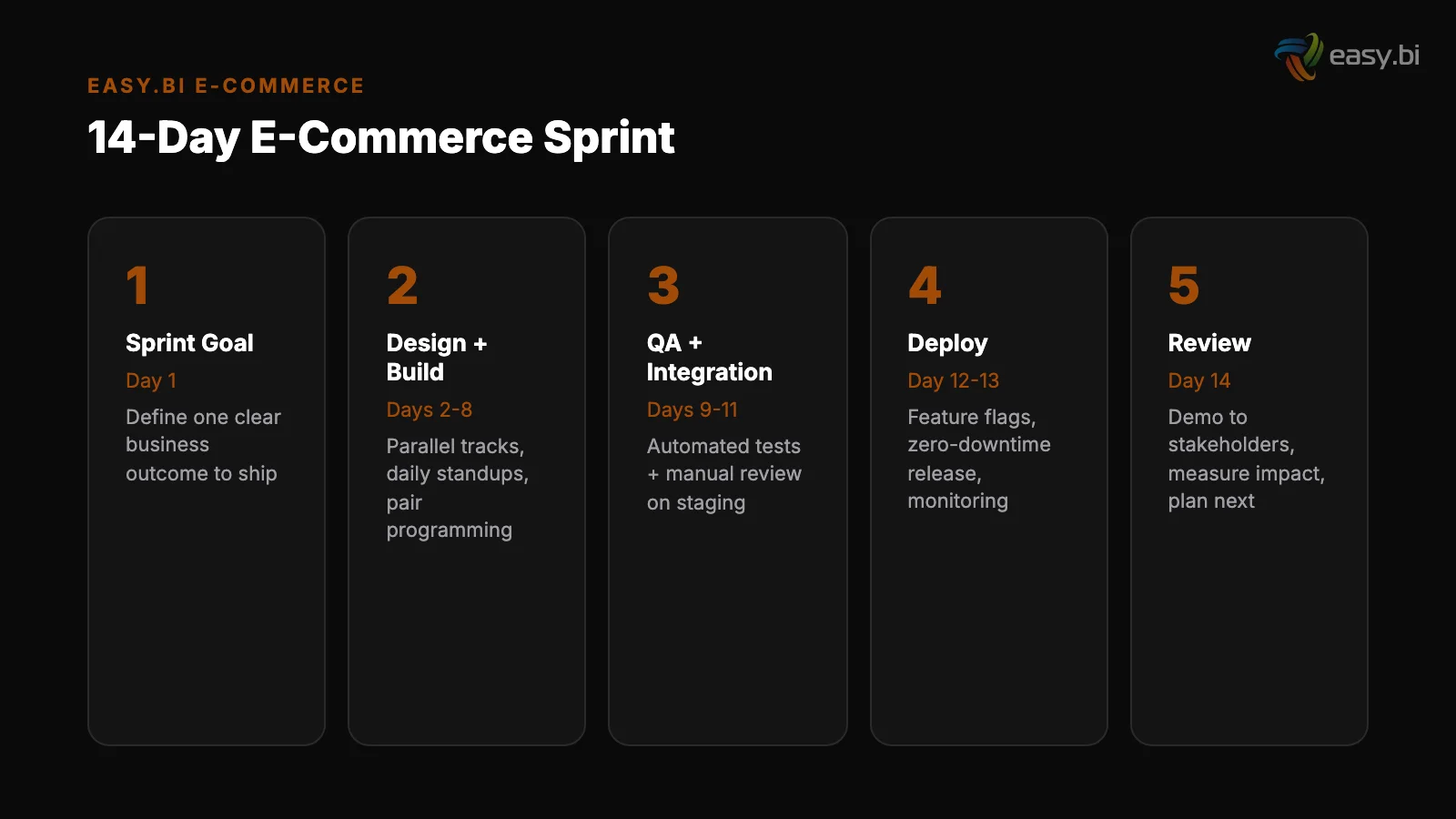
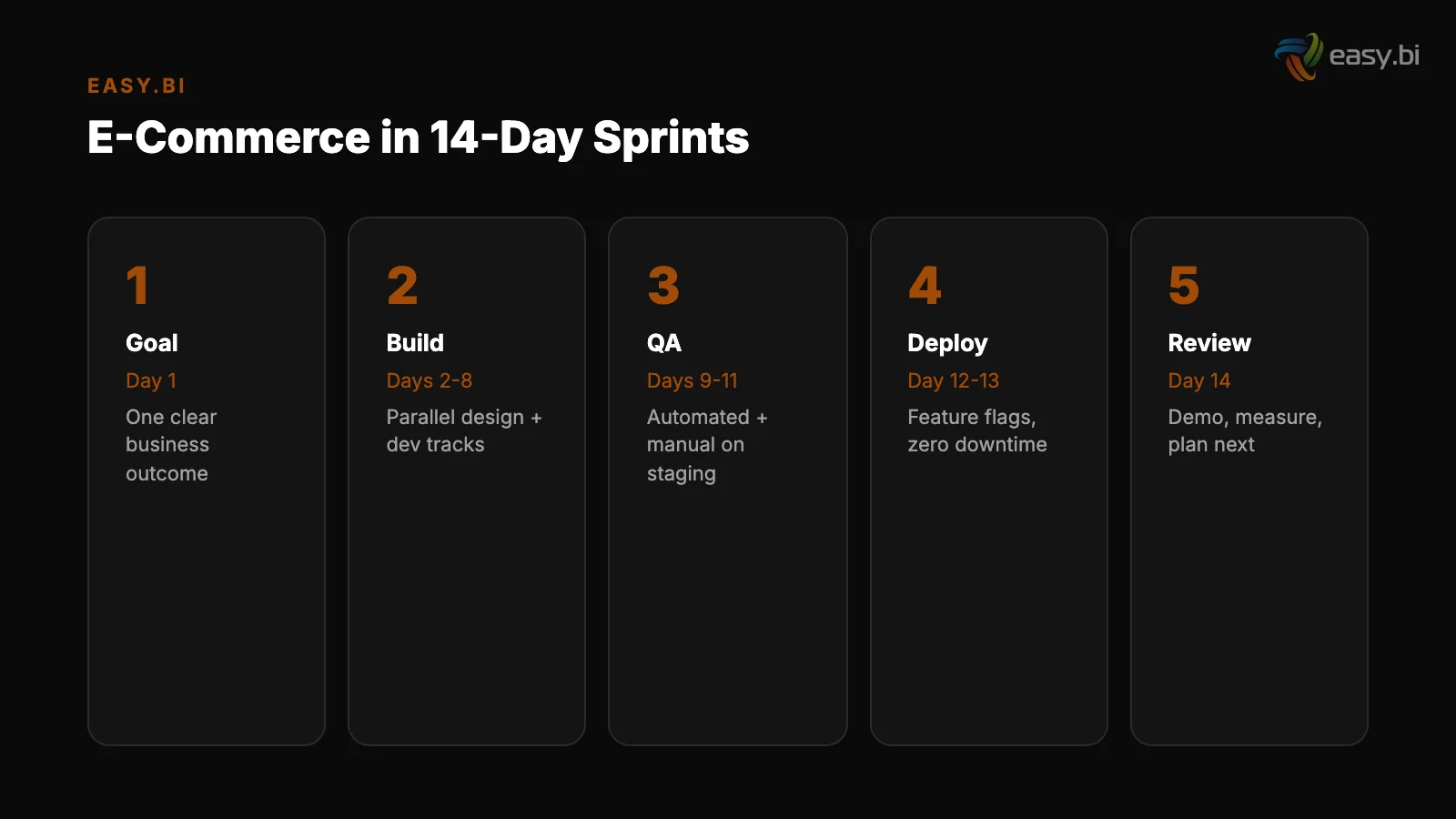
Day 1: Sprint kickoff and backlog refinement. The Product Owner presents the sprint goal - a single sentence describing the business outcome this sprint delivers. Not "implement 5 Jira tickets" but "reduce checkout abandonment by improving the shipping options UI." The team reviews and estimates work packages.
Every work package has acceptance criteria written in user-facing terms.
Day 1: Sprint kickoff and backlog refinement
Days 2-8: Development and continuous integration. Engineers work in short-lived feature branches (1-2 days maximum). Every merge to main triggers automated builds, unit tests, and integration tests. Continuous integration reduces integration problems by 90%.[5] No branch lives longer than 48 hours.
If a feature cannot be completed in 48 hours, it is behind a feature flag.
Days 9-10: QA and staging validation. The full sprint increment is deployed to a staging environment that mirrors production - same data, same integrations, same infrastructure. QA runs automated regression tests plus manual exploratory testing on critical paths: product search, add to cart, checkout, payment, order confirmation.
Days 2-8: Development and continuous integration
Day 11: Deployment to production. Blue-green deployment with feature flags. New features deploy dark. Internal team validates in production. Then flags activate progressively - 5%, 25%, 100%.
Days 12-13: Monitoring and stabilization. The team monitors error rates, conversion rates, page load times, and order completion rates. Any regression triggers an immediate flag deactivation or hotfix.
Day 14: Sprint review and retrospective. Demo the working production features to stakeholders. Review metrics. The retrospective produces at least one actionable process improvement for the next sprint.
+35% conversion. +22% AOV. EUR 50M+ GMV processed.
Our Shopware-certified team delivers e-commerce at scale with 14-day sprint cycles. 80% less manual work through system integrations.
Start with a Strategy CallWhat Automated Testing Looks Like for Sprint E-Commerce
You cannot ship every 14 days without automated testing. Manual QA alone cannot cover the test surface of a modern e-commerce platform within a 2-day QA window. Automated testing saves 20-40% of total QA costs and catches 80% of defects before production.[6]
The testing pyramid for e-commerce sprint delivery looks like this:
Unit tests (run on every commit)
Unit tests (run on every commit). Cover business logic - price calculations, discount rules, tax computations, inventory checks. These run in milliseconds and catch logic errors before they reach integration.
Integration tests (run on every merge to main). Validate that your commerce engine communicates correctly with PIM, ERP, payment providers, and shipping APIs. Mock external services for speed, but run full integration tests nightly against sandbox environments.
Integration tests (run on every merge to main)
End-to-end tests (run before every deployment). Automated browser tests that walk through critical user journeys: search for a product, add to cart, enter shipping details, complete payment, verify order confirmation. These take 10-20 minutes and catch UI regressions that unit and integration tests miss.
Performance tests (run before peak periods). Load tests that simulate 2-5x your normal traffic. If Black Friday traffic is 4x your average Tuesday, your load tests should validate 5x. Run these weekly during the 6 weeks before any peak period.
How Do You Handle Hotfixes Between Sprints?
Even with feature flags and blue-green deployments, production issues happen. The question is not whether you will need a hotfix - it is how fast you can ship one without derailing the current sprint.
The rule is simple: hotfixes go through the same pipeline, just faster. A hotfix gets a feature branch, automated tests, staging validation, and blue-green deployment - but compressed into hours instead of days. No shortcuts on testing. No direct pushes to production.
The cost of fixing a bug in production is 6x higher than fixing it during implementation.[7] Skipping the pipeline to save 2 hours creates bugs that cost 2 weeks.
The sprint backlog absorbs the capacity hit. If a hotfix consumes 8 hours of engineering time, the sprint scope reduces by 8 hours. No heroics, no overtime, no pretending the sprint goal is still achievable at full scope.
Honest capacity accounting is what keeps 14-day cadences sustainable over months and years.
What Results Does This Cadence Produce?
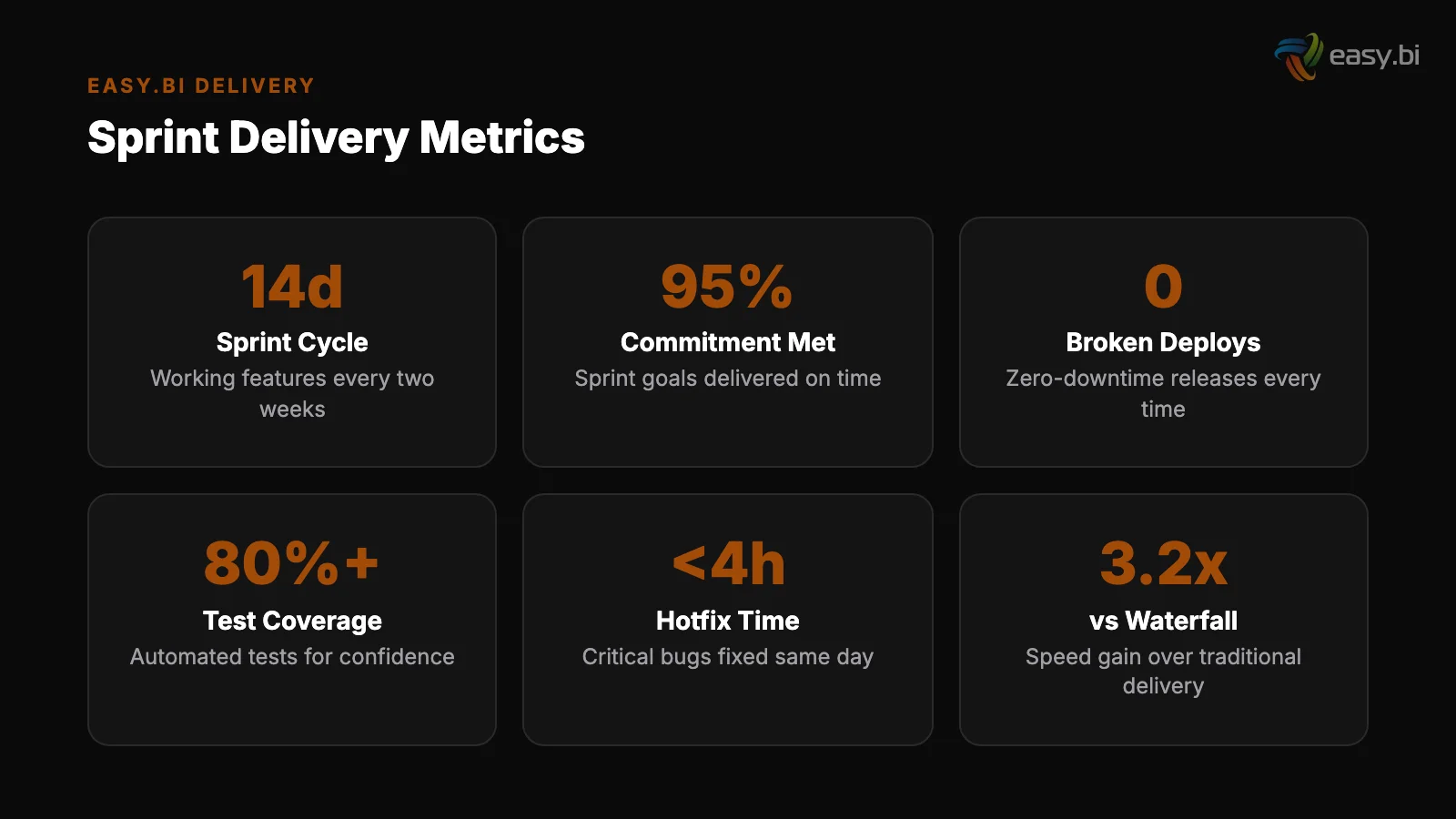
Teams running this model consistently report these outcomes after 3-4 sprints of stabilization:
- Deployment frequency: from monthly to every 14 days (or more frequently for hotfixes)
- Change failure rate: under 5%, compared to the industry average of 15-20%
- Mean time to recovery: under 1 hour, down from 4-8 hours with manual rollbacks
- Feature throughput: 40% more features shipped per quarter
- Unplanned downtime: zero in the last 12 months for teams fully on this model
These are not theoretical numbers. They come from production e-commerce systems handling millions of euros in monthly revenue. The REWE cadence works because it combines the speed of agile delivery with the safety nets that revenue-critical systems demand.
easy.bi's e-commerce team has processed EUR 50M+ in gross merchandise value across 30+ projects, with an average +35% conversion rate improvement. That track record is built on this exact sprint cadence - 14-day cycles with feature flags, blue-green deployments, and no compromises on testing.
For the full strategic context on how sprint delivery fits into enterprise e-commerce operations, read the Enterprise E-Commerce Playbook. To understand how platform choice affects your sprint cadence, see Shopware vs commercetools vs Adobe Commerce.
For a real-world example of continuous delivery at REWE scale, explore E-Commerce at Scale: Lessons from REWE.
If you are running e-commerce on monthly or quarterly release cycles and want to move to 14-day delivery without the risk, start with a conversation. We have done this transition for teams of 4 and teams of 20 - the principles scale, but the implementation details differ.
References
- [1] Scrum.org - State of Scrum Report: Sprint Length and Feature Delivery (2023)
- [2] Scrum Alliance - Sprint Retrospectives and Velocity Impact (2023)
- [3] LaunchDarkly / Forrester - Total Economic Impact of Feature Flags (2023)
- [4] DORA - Accelerate State of DevOps Report (2024)
- [5] ThoughtWorks - Continuous Integration Best Practices (2023)
- [6] Capgemini - World Quality Report (2024)
- [7] IBM Systems Sciences Institute - Cost of Defects by Phase (2023)
Explore Other Topics
Ready to scale your e-commerce?
30-minute call with an engineering lead. No sales pitch - just honest answers about your project.
98% engineer retention · 14-day delivery sprints · No lock-in contracts
Related Reading

How REWE Runs Multi-Country E-Commerce on 14-Day Sprint Cycles
How enterprise retailers like REWE ship e-commerce features every 14 days. The sprint delivery model, team structure, and QA gates.
Enno Bassen
E-Commerce Conversion Optimization: The 35% Improvement Framework
A systematic 6-lever framework that delivers +35% conversion rate and +22% AOV for DACH e-commerce. Page speed, checkout, product UX, search, cross-sell, and mobile optimization with measurable benchmarks.
Enno Bassen
The True Cost of Disconnected E-Commerce Systems (ERP, PIM, CRM)
Disconnected ERP, PIM, and CRM systems cost mid-market retailers 80+ hours of manual work per week and 23% in lost revenue. Learn the API-first integration architecture that eliminates data silos.
Enno Bassen