
How to Write a Software Requirements Document That Developers Actually Use

Table of Contents+
- Why Do Traditional SRS Documents Fail?
- What Format Do Developers Actually Need?
- What Do Developers Need That Product Managers Rarely Provide?
- How Should Business and Engineering Teams Collaborate on Requirements?
- What Does a Good Requirements Template Look Like?
- What Are the Most Common Mistakes in Requirements Writing?
- How Do You Maintain Requirements as the Project Evolves?
- How Do You Handle Requirements for Complex Integrations?
- From Document to Discipline
- References
TL;DR
Traditional 40-page SRS documents fail because they describe solutions instead of problems, lack testable acceptance criteria, and are written in isolation from the engineering team. The effective alternative combines user stories for business context with acceptance criteria for technical precision, structured through collaborative refinement sessions rather than handoff documents.
Key Takeaways
- •Poor requirements cause nearly 60% of software project failures, and 70 to 85% of all rework costs trace back to requirements defects discovered after development has started.
- •The most effective requirements format combines user stories for context with acceptance criteria for precision - giving developers the 'why' and the 'what done looks like' in a single artifact.
- •Requirements documents fail when business stakeholders describe solutions instead of problems. Write what the system must do, not how it should do it - implementation decisions belong to the engineering team.
- •Every requirement needs exactly one owner, one priority level, and testable acceptance criteria. If you cannot write a test for a requirement, the requirement is not specific enough to build.
- •Collaboration beats documentation. A 30-minute refinement session between a product manager and two engineers produces better requirements than a 40-page specification written in isolation.
Traditional SRS documents fail 60% of the time. Learn the user story plus acceptance criteria format that developers actually use, with templates, common mistakes, and collaboration frameworks.
Poor requirements gathering causes nearly 60% of software project failures.[1] Not bad code. Not wrong technology choices. Not insufficient budgets. The requirements - the document that tells engineers what to build - is where most projects begin their slide toward failure.
The irony is that most organizations know requirements matter. They invest weeks writing 40-page Software Requirements Specifications. They hire business analysts. They run workshops. And they still end up with documents that developers skim once, misinterpret twice, and eventually ignore entirely in favor of asking the product manager directly.
The problem is not that teams skip requirements. The problem is that the standard approach to writing requirements produces documents that are simultaneously too long and too vague - full of prose that describes the vision but missing the specific details that engineers need to write code.
This guide covers why traditional SRS documents fail, what format actually works, and how to build a collaboration model between business stakeholders and engineering teams that produces requirements worth following.
Why Do Traditional SRS Documents Fail?
The Software Requirements Specification has been the standard requirements format since the IEEE published the 830 standard in 1984. It was designed for an era of waterfall development where the entire system was specified upfront, approved by a committee, and then handed to developers for implementation.
That era is over. But the document format persists.
Traditional SRS documents fail for three structural reasons that no amount of better writing can fix.
They describe solutions instead of problems. A typical SRS reads: "The system shall display a dropdown menu containing all available product categories, sorted alphabetically, with a maximum of 50 items visible." This prescribes the UI component (dropdown), the sort order (alphabetical), and the display limit (50). What it does not say is why the user needs to select a category, what happens after they select one, or what the business impact is if this feature does not work correctly. Developers build exactly what the document says and deliver something that technically meets the specification but does not solve the actual business problem.
They are written in isolation. The business analyst writes the SRS, sends it to the development team for "review," and the development team signs off because arguing over a 40-page document is exhausting. 57% of project failures trace back to communication breakdowns between business and technology stakeholders.[2] The handoff model - where one group writes and another group builds - is the structural cause of that communication breakdown.
They attempt completeness upfront. A traditional SRS tries to specify every feature, every edge case, every integration before a single line of code is written. But until you have built the actual software and shown it to actual users, the specification is a set of assumptions about what users want, how functionality should work, and how to technically implement it.[3] The more detailed the upfront specification, the more expensive the rework when those assumptions prove wrong.
In my 15 years of backend engineering, I have never seen a 40-page SRS that was still accurate by sprint 4. The document becomes a historical artifact - useful for understanding what people thought the system should do in January, irrelevant to what the system actually needs to do in March.
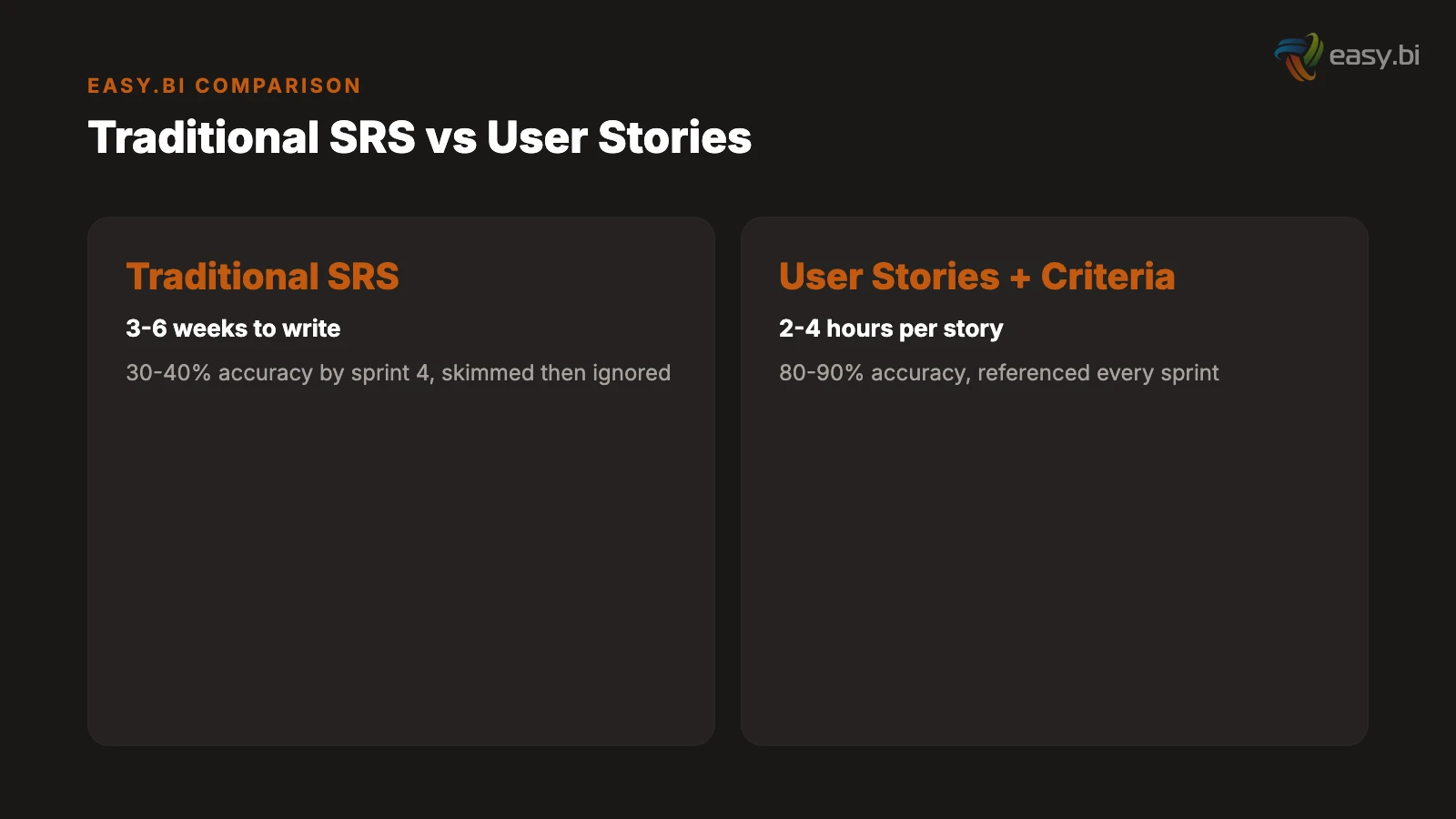
| SRS Approach | Time to Produce | Accuracy at Sprint 4 | Developer Usage Rate |
|---|---|---|---|
| Traditional 40-page SRS | 3-6 weeks | 30-40% | Skimmed once, then ignored |
| User stories + acceptance criteria | 2-4 hours per story | 80-90% | Referenced every sprint |
| Bullet-point feature list | 2-3 days | 50-60% | Too vague to build from |
| Verbal briefing only | 1 hour | 15-25% | Generates constant questions |
See how we deliver 60% faster time-to-market with 40% lower TCO than off-the-shelf.
What Format Do Developers Actually Need?
Developers need two things from a requirements document: context and precision. Context tells them why a feature matters and who it serves. Precision tells them exactly what "done" looks like. The format that delivers both is the user story paired with acceptance criteria.
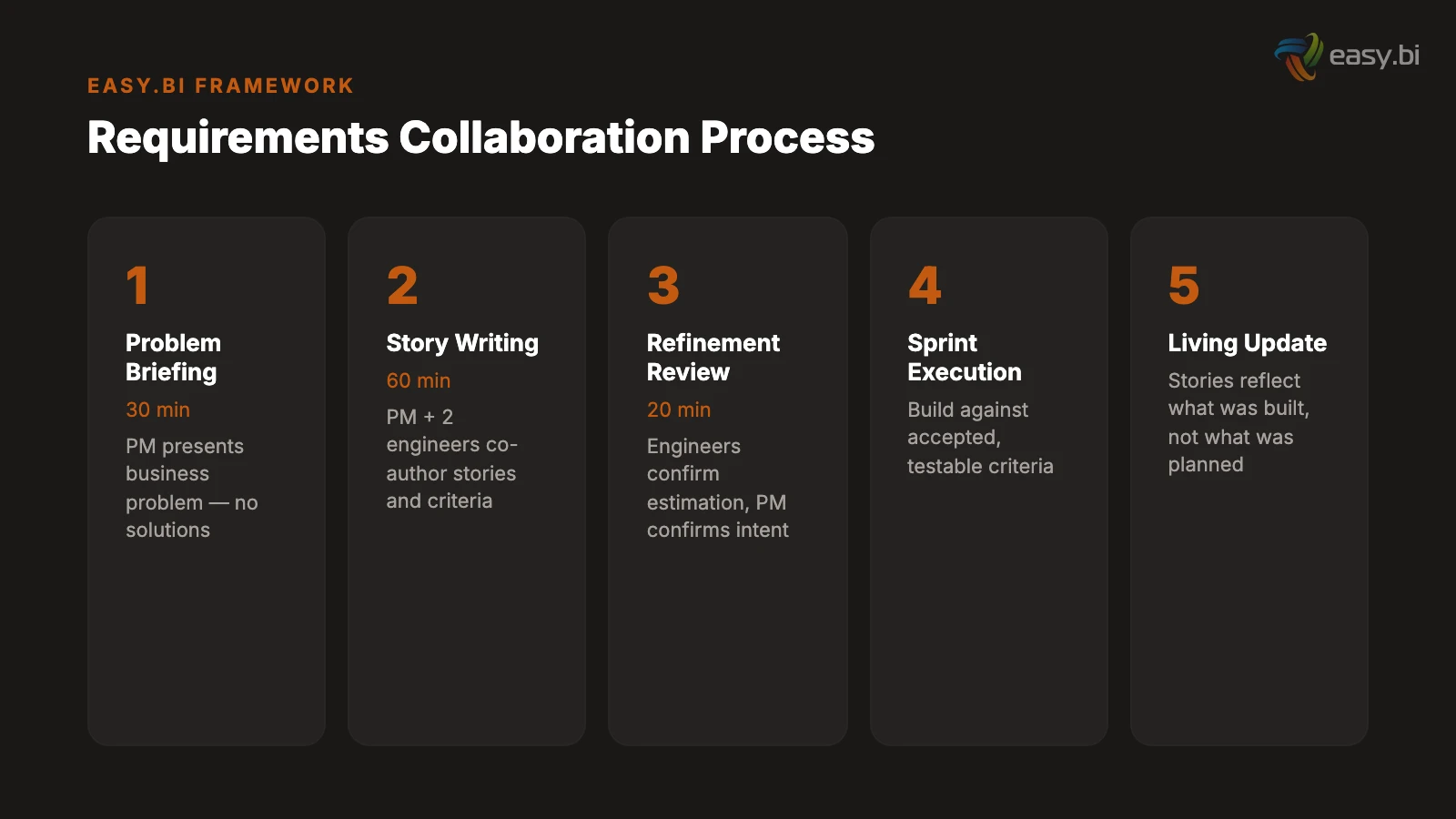
The user story provides context. A user story follows the format: "As a [role], I need to [action] so that [outcome]." This single sentence communicates who benefits, what they need to do, and why it matters. "As a warehouse manager, I need to approve incoming shipments on my mobile device so that I can process deliveries without returning to my desk" gives an engineer everything they need to understand the business context.
Acceptance criteria provide precision. Each user story includes 3 to 8 acceptance criteria that define the boundaries of "done" in testable terms. These are not implementation instructions. They are conditions that must be true when the feature is complete.
For the warehouse manager story, acceptance criteria include: "Given I am on the mobile approval screen, when I tap approve, then the shipment status changes to 'received' and the inventory count updates within 5 seconds." "Given the network connection is unavailable, when I tap approve, then the approval is queued locally and synced when connectivity resumes." "Given a shipment contains items not in the purchase order, when I view the shipment details, then mismatched items are highlighted and approval requires a comment explaining the discrepancy."
The cost of fixing a defect found in production is 6.5x higher than fixing it during the design phase.[4] Well-written acceptance criteria shift defect detection left - they surface edge cases, boundary conditions, and error states before a single line of code is written.
The Given-When-Then format is non-negotiable. Acceptance criteria written as "the system should handle errors gracefully" are useless. Errors from which source? Handled how? Gracefully according to whom? The Given-When-Then format forces specificity: Given [precondition], When [action], Then [observable result]. If you cannot write a Given-When-Then statement for a requirement, the requirement is not specific enough to build.
"The best requirements document is the one that makes a developer say 'I know exactly what to build and how to test it' after reading it. If they have to schedule a meeting to ask clarifying questions, the document failed."
What Do Developers Need That Product Managers Rarely Provide?
Product managers excel at defining the happy path - the ideal scenario where everything works as expected. Developers need the sad paths, the edge cases, and the boundary conditions that define how the system behaves when things go wrong. 30 to 50% of development effort is spent on avoidable rework, and the majority of that rework traces back to requirements that covered the happy path but missed the exceptions.[5]
Six categories of information that developers need and product managers typically omit.
Error states. What happens when the API call fails? When the user enters invalid data? When the database is temporarily unavailable? When the third-party service returns an unexpected response? Every integration point and every user input field has at least 3 error states. Specify them, or the developer will either guess (creating inconsistent error handling) or ask (creating meeting overhead).
Data validation rules. "The user enters their email address" is not a requirement. What constitutes a valid email format? Is it validated on keystroke or on submit? Does the system check for disposable email domains? What is the maximum length? Can it contain plus-sign aliases? These specifics determine implementation. Omitting them does not simplify the requirement - it delegates the decision to whoever writes the code, and they will make different choices than the product manager would have.
Boundary conditions. "The dashboard displays recent orders" raises immediate questions. How many is "recent"? What if there are zero orders? What if there are 10,000? Is there pagination? What is the sort order? What fields are displayed? How does it handle orders in different states (pending, shipped, cancelled, returned)? Boundary conditions define where the feature starts and stops. Without them, scope is ambiguous and scope creep is inevitable. Scope creep affects 52% of all projects, increasing delivery time by an average of 27%.[6]
Performance requirements. "The search must be fast" is not testable. "Search results return within 200 milliseconds for queries against a dataset of up to 500,000 records" is testable, measurable, and architecturally significant. Performance requirements determine infrastructure decisions, caching strategies, and database indexing choices. Omitting them means the developer optimizes for nothing - or optimizes for the wrong thing.
Security and access control. Which user roles can perform this action? Are there data visibility restrictions? Does the action require additional authentication (re-entering a password, two-factor confirmation)? Is the data subject to GDPR or other regulatory requirements? Security requirements discovered mid-sprint force architectural rework. Security requirements discovered post-launch create compliance risk.
Integration dependencies. If the feature depends on data from another system, specify: the source system, the API or data format, the expected response time, the fallback behavior if the source is unavailable, and the data freshness requirements. "It pulls data from SAP" is not a requirement. "It retrieves the current inventory count from SAP via the MM API, with a maximum latency of 3 seconds, falling back to the last cached value if SAP is unreachable" is a requirement.
How Should Business and Engineering Teams Collaborate on Requirements?
The single most damaging pattern in requirements writing is the handoff: business writes, engineering receives. This creates an adversarial dynamic where business blames engineering for not building what they specified, and engineering blames business for specifying something unbuildable. Cross-functional teams are 35% more productive than siloed teams,[7] and nowhere is that productivity gap more visible than in requirements definition.
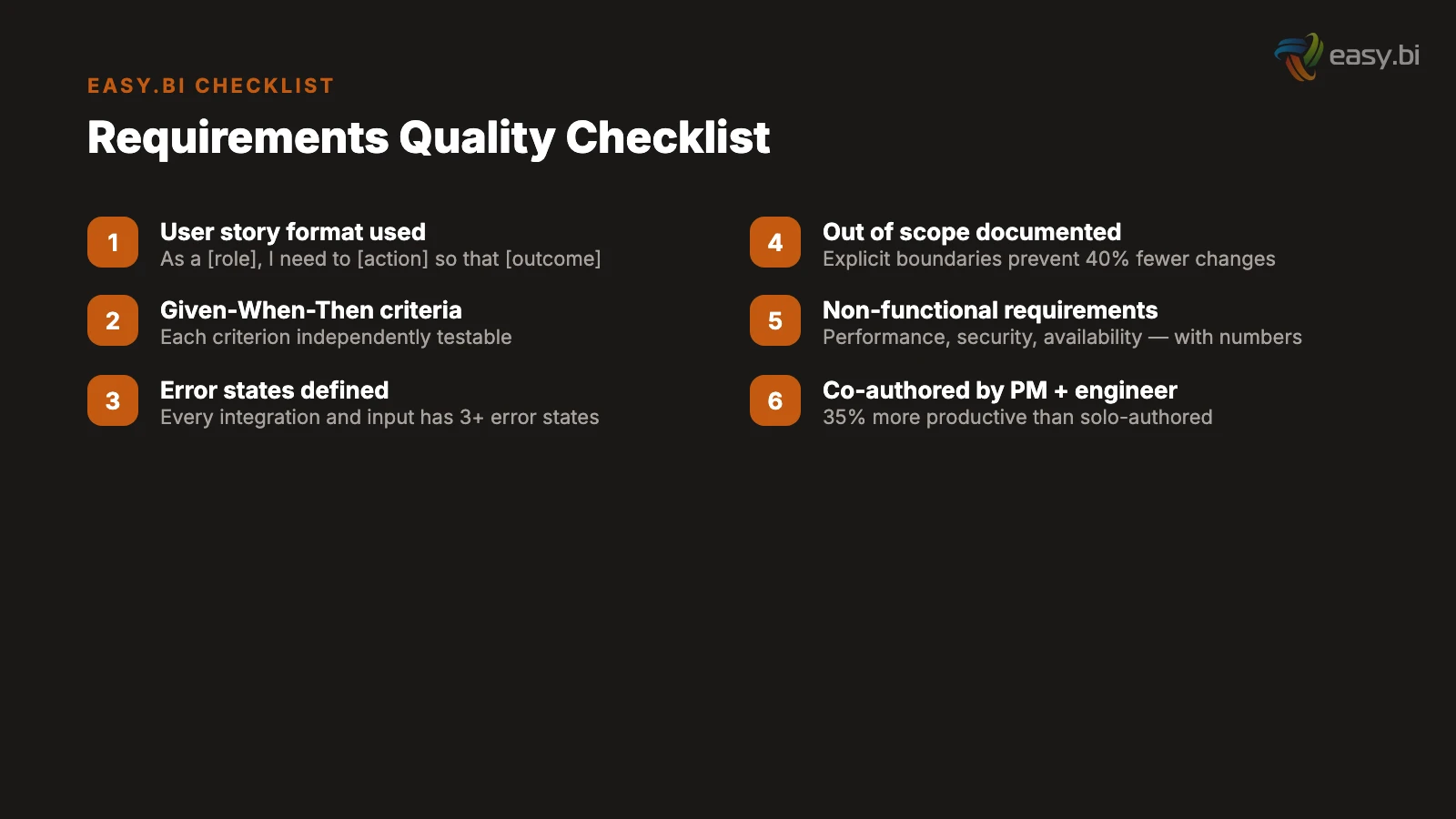
A collaborative model replaces the handoff with three structured interactions.
Interaction 1: The problem briefing (30 minutes). The product manager presents the business problem to the engineering team: who has the problem, how it manifests, what the business impact is, and what success looks like in measurable terms. No solutions. No UI mockups. No technical suggestions. Just the problem. Engineers ask clarifying questions about the business context, not about implementation. This session produces a shared understanding of what needs to be solved.
Interaction 2: The story writing session (60 minutes). The product manager and 2 engineers collaborate on writing user stories and acceptance criteria. The product manager contributes business context and user knowledge. The engineers contribute technical constraints, edge cases, and testable acceptance criteria. This session typically produces 3 to 5 fully specified user stories - enough for one sprint. Only 31% of software projects are considered fully successful,[8] and the gap between success and failure often traces back to whether requirements were written collaboratively or handed off.
Interaction 3: The refinement review (20 minutes). Before sprint planning, the team reviews the user stories one final time. Engineers confirm they can estimate the work. The product manager confirms the acceptance criteria capture the business intent. Any gaps are filled. Any ambiguities are resolved. This 20-minute investment prevents the 2-hour mid-sprint clarification meetings that plague handoff-based processes.
This three-session model takes approximately 2 hours per sprint. A traditional SRS takes 3 to 6 weeks upfront and still produces requirements that are 30 to 40% inaccurate by sprint 4. The collaborative model invests less total time and produces requirements that are 80 to 90% accurate because they are written by the people who understand the problem and the people who will solve it - together.
What Does a Good Requirements Template Look Like?
A practical requirements template balances structure with usability. Too little structure and every story is formatted differently. Too much structure and the template becomes bureaucratic overhead that people work around instead of with.
The template that works across our projects has five sections per user story.
Section 1: User story statement. "As a [role], I need to [action] so that [business outcome]." One sentence. No compound stories ("As a user, I need to search AND filter AND sort" is three stories, not one).
Section 2: Business context. Two to three sentences explaining why this story matters, who requested it, and what business metric it impacts. This is the section that prevents developers from building technically correct features that miss the point.
Section 3: Acceptance criteria. Three to eight Given-When-Then statements covering the happy path, primary error states, and key boundary conditions. Each criterion must be independently testable. If an acceptance criterion contains the word "and" connecting two conditions, split it into two criteria.
Section 4: Out of scope. Explicitly state what this story does not include. "This story does not cover bulk import functionality, which is tracked separately as STORY-247." The out-of-scope section prevents scope creep by creating a clear boundary and redirecting related-but-separate requests to their own stories. Projects that define clear scope boundaries from the start experience 40% fewer change requests during development.[9]
Section 5: Dependencies and assumptions. List any external systems, data sources, or other stories this story depends on. Document any assumptions that, if proven wrong, would change the implementation. "Assumes the SAP API supports real-time inventory queries. If batch-only, this story requires re-estimation."
| Template Section | Who Writes It | Why It Matters |
|---|---|---|
| User story statement | Product manager | Defines the who, what, and why in one sentence |
| Business context | Product manager | Prevents technically correct but business-wrong implementations |
| Acceptance criteria | Joint (PM + engineers) | Defines done in testable terms, surfaces edge cases early |
| Out of scope | Joint (PM + engineers) | Prevents scope creep by creating explicit boundaries |
| Dependencies and assumptions | Engineers with PM input | Identifies risks and external blockers before sprint starts |
What Are the Most Common Mistakes in Requirements Writing?
After reviewing requirements documents across hundreds of projects, the same mistakes appear repeatedly. They are not mistakes of effort - the authors are trying. They are mistakes of training. Business stakeholders are rarely taught how to write requirements that engineers can build from.
Mistake 1: Specifying implementation instead of behavior. "Use a PostgreSQL database with a normalized schema" is an implementation decision, not a requirement. "The system must support 500 concurrent users with sub-200ms query response times" is a requirement that allows the engineering team to choose the right implementation. When business stakeholders specify technology choices, they constrain the solution space without the technical knowledge to make those constraints well. Omitted or missing requirements account for 33% of all requirements defects - the largest single category.[10] Ironically, over-specification in some areas often correlates with under-specification in others.
Mistake 2: Using vague adjectives as requirements. "The interface must be user-friendly." "The system must be fast." "The reports must be comprehensive." These words mean different things to every person who reads them. Replace every vague adjective with a measurable criterion: "Task completion rate above 85% for first-time users" replaces "user-friendly." "Page load under 1.5 seconds on a 4G connection" replaces "fast."
Mistake 3: Writing requirements as a solo exercise. A business analyst who writes requirements without talking to developers will miss technical constraints. A developer who writes requirements without talking to users will miss business context. The omission rate for solo-authored requirements is roughly double that of collaboratively authored requirements. Requirements are a communication tool, not a documentation exercise.
Mistake 4: Treating all requirements as equal priority. When every requirement is marked "high priority," nothing is high priority. Use MoSCoW categorization (Must, Should, Could, Will-not) to create a clear hierarchy. The first release should contain only Must-have items. Should-have items go into the second release. Could-have items go into the backlog. This prioritization forces difficult conversations upfront - which is exactly when those conversations should happen.
Mistake 5: Omitting non-functional requirements entirely. 83% of software projects exceed their original schedule,[8] and a significant contributor is non-functional requirements that surface mid-project. "Oh, this needs to handle 10,000 concurrent users" in sprint 6 means rearchitecting what was built in sprints 1 through 5. Non-functional requirements - performance, security, availability, scalability, compliance - must be defined before architecture decisions are made.
50+ custom projects. 99.9% uptime. 60% faster.
Senior-only engineering teams deliver production-grade platforms in under 4 months. No juniors on your project.
Start with a Strategy CallHow Do You Maintain Requirements as the Project Evolves?
A requirements document that is accurate on day 1 and outdated by day 30 is not a living document - it is a snapshot that decays. The challenge is maintaining requirements as a current, trusted source of truth throughout the project lifecycle.
Version requirements alongside code. Store user stories and acceptance criteria in the same project management tool where sprint work is tracked. When a story is modified during development (because an assumption proved wrong, or a new edge case was discovered), update the story immediately. The story should always reflect what was actually built, not what was originally planned. Connecting user stories and tasks to high-level requirements ensures traceability throughout the development lifecycle.[3]
Run a 15-minute requirements review every sprint. At the start of each sprint, the product manager and tech lead review the stories planned for that sprint. They check for accuracy, completeness, and any dependencies that have changed since the stories were written. This 15-minute ritual catches requirement drift before it becomes rework.
Document decisions, not just requirements. When the team decides to handle an edge case differently than originally specified, record the decision with its rationale. "Changed the offline sync interval from 5 minutes to 15 minutes because battery consumption on field devices exceeded acceptable levels - decided in sprint 4 review with warehouse operations lead." This decision log prevents future team members from "fixing" intentional design choices.
Use the definition of done as a quality gate. Every user story passes through the same definition of done before it is marked complete: all acceptance criteria pass, automated tests cover the criteria, the story is updated to reflect any changes made during development, and the product manager has verified the implementation against the business context. This ensures the requirements document stays synchronized with the actual product.
API-first companies grow revenue 38% faster than those without an API strategy.[11] The same principle applies to requirements: companies that treat requirements as a living API between business and engineering - versioned, maintained, and collaboratively evolved - outperform those that treat them as a one-time handoff document.
How Do You Handle Requirements for Complex Integrations?
Integration requirements are where traditional SRS documents fail most catastrophically. "The system integrates with SAP" is not a requirement. It is a wish. Real integration requirements address seven dimensions that determine whether the integration will work in production.
Data mapping. Which fields in the source system map to which fields in the target system? What are the data types, formats, and character encoding on each side? What happens when a required field in the target is null in the source? Data mapping documents are tedious to create and essential to get right. Every unmapped field becomes a production bug.
Error handling and retry logic. What happens when the target system is unavailable? When it returns a 500 error? When it times out? When it returns data in an unexpected format? Define the retry strategy (immediate retry, exponential backoff, dead letter queue), the alert threshold (after N failures, notify the operations team), and the fallback behavior (use cached data, display an error message, block the workflow).
Data freshness and synchronization frequency. Does the integration need real-time data (sub-second latency), near-real-time (seconds to minutes), or batch (hourly, daily)? The answer determines the architecture. Real-time requires event-driven integration or webhooks. Near-real-time can use polling or change data capture. Batch uses scheduled jobs. Specifying the wrong synchronization model creates either unnecessary complexity (real-time when batch would suffice) or unacceptable latency (batch when the business needs real-time).
Volume and throughput. How many records per second, per minute, per hour? What is the peak volume? What is the average? Integration systems that work perfectly at 100 transactions per minute can collapse at 1,000. Specify the expected throughput, the peak throughput, and the growth projection over 12 months.
For a deeper treatment of how integration complexity compounds in real projects, see our case study on WeberHaus's digital transformation, where 47 business rules around offline synchronization were discovered during discovery. For the technical architecture that supports complex integrations, our guide on API-first architecture covers the patterns that keep integration points maintainable as they scale. And if you are evaluating whether your current requirements process is working, our partner evaluation framework includes specific criteria for requirements quality.
From Document to Discipline
Writing requirements that developers actually use is not a document formatting exercise. It is a discipline that requires collaboration between the people who understand the business problem and the people who will solve it technically.
The shift from traditional SRS to collaborative user stories with acceptance criteria is not about adopting a new template. It is about changing the relationship between business and engineering from handoff to partnership. When both sides own the requirements - when the product manager writes the business context and the engineer writes the acceptance criteria in the same session - the resulting document reflects reality instead of assumptions.
The numbers support this approach. 60% of project failures trace back to requirements.[1] 70 to 85% of rework costs come from requirements defects.[5] Projects with clear requirements are 97% more likely to succeed.[12] The leverage is clear: improve your requirements process and you improve everything downstream - estimation accuracy, development velocity, test coverage, and stakeholder satisfaction.
Start with your next sprint. Pick one feature. Write it as a user story with Given-When-Then acceptance criteria. Co-author it with an engineer. Compare the result to your traditional requirements format. The difference will be immediately obvious - and once your team experiences it, going back to 40-page SRS documents will feel like going back to paper maps after using GPS.
References
- [1] IAG Consulting / PMI (2024). pmi.org
- [2] PMI (2024). "57% of project failures trace back to communication breakdowns betw pmi.org
- [3] BrowserStack (2025). "Until you have built actual software and shown it to actua browserstack.com
- [4] IBM Systems Sciences Institute (2022). ibm.com
- [5] ScopeMaster / IEEE (2024). scopemaster.com
- [6] PMI (2024). "Scope creep affects 52% of all projects, increasing delivery time b pmi.org
- [7] Harvard Business Review / Bain (2023).
- [8] Standish Group (2023).
- [9] Jama Software (2024). "Projects that define clear scope boundaries from the star jamasoftware.com
- [10] NASA / IEEE (2024). "Omitted or missing requirements account for 33% of all requ nasa.gov
- [11] MuleSoft / Salesforce (2023). mulesoft.com
- [12] Standish Group (2023).
Explore Other Topics
Ready to build your custom platform?
30-minute call with an engineering lead. No sales pitch - just honest answers about your project.
98% engineer retention · 14-day delivery sprints · No lock-in contracts
Related Reading

What Does Custom Software Development Actually Cost in 2026?
Real cost breakdown for custom software in 2026. DACH vs. Eastern Europe vs. offshore rates, 5-year TCO, and EUR pricing by project type.
Christian Kaspar
The 7 Reasons Custom Software Projects Go Over Budget
Data-driven analysis of 7 reasons custom software projects blow budgets. Root causes, real cost impact, and prevention strategies for each.
Filip Kralj
When Does Off-the-Shelf Software Start Costing You More Than Custom?
Off-the-shelf software hides costs in customization fees, per-seat pricing, and workaround labor. Learn when custom becomes 40% cheaper.
Andrej Lovsin