
Accessibility as a Business Advantage, Not a Compliance Checkbox

Table of Contents+
- Why Is Accessibility a Business Decision, Not a Legal Checkbox?
- What Does the European Accessibility Act Mean for Your Products?
- How Big Is the Accessibility Market Opportunity?
- What Are WCAG 2.1 AA and AAA, and Which Do You Need?
- How Does Accessibility Improve SEO Performance?
- What Are the Quick Wins You Can Ship This Week?
- Which Testing Tools Actually Work?
- Building Accessibility Into Your Design System
- References
TL;DR
Most conversations about accessibility in enterprise software start with compliance. "What do we need to do to avoid getting sued?" It is the wrong question, and it produces the wrong outcome - minimal effort, minimal investment, and minimal value.
Key Takeaways
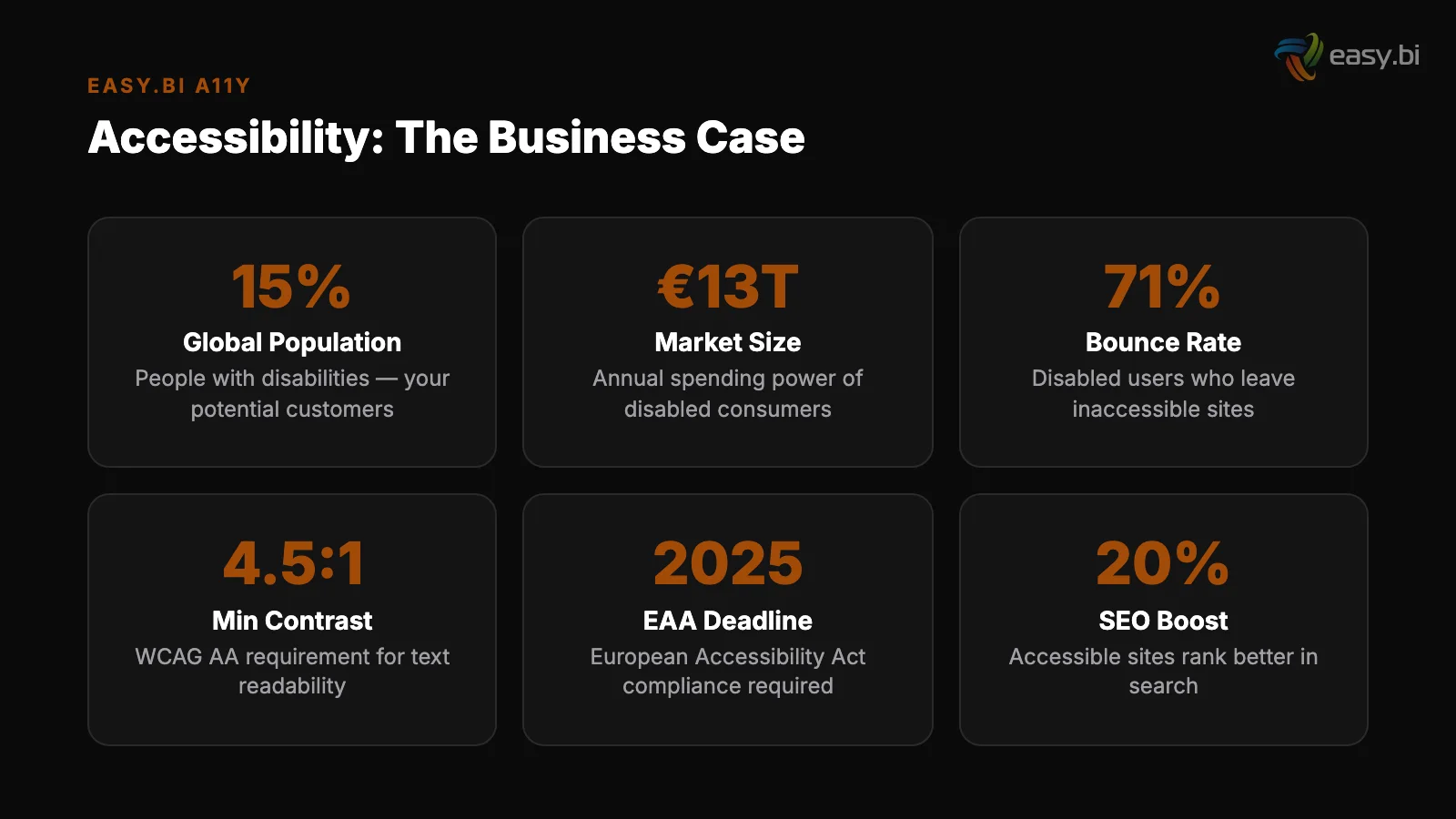
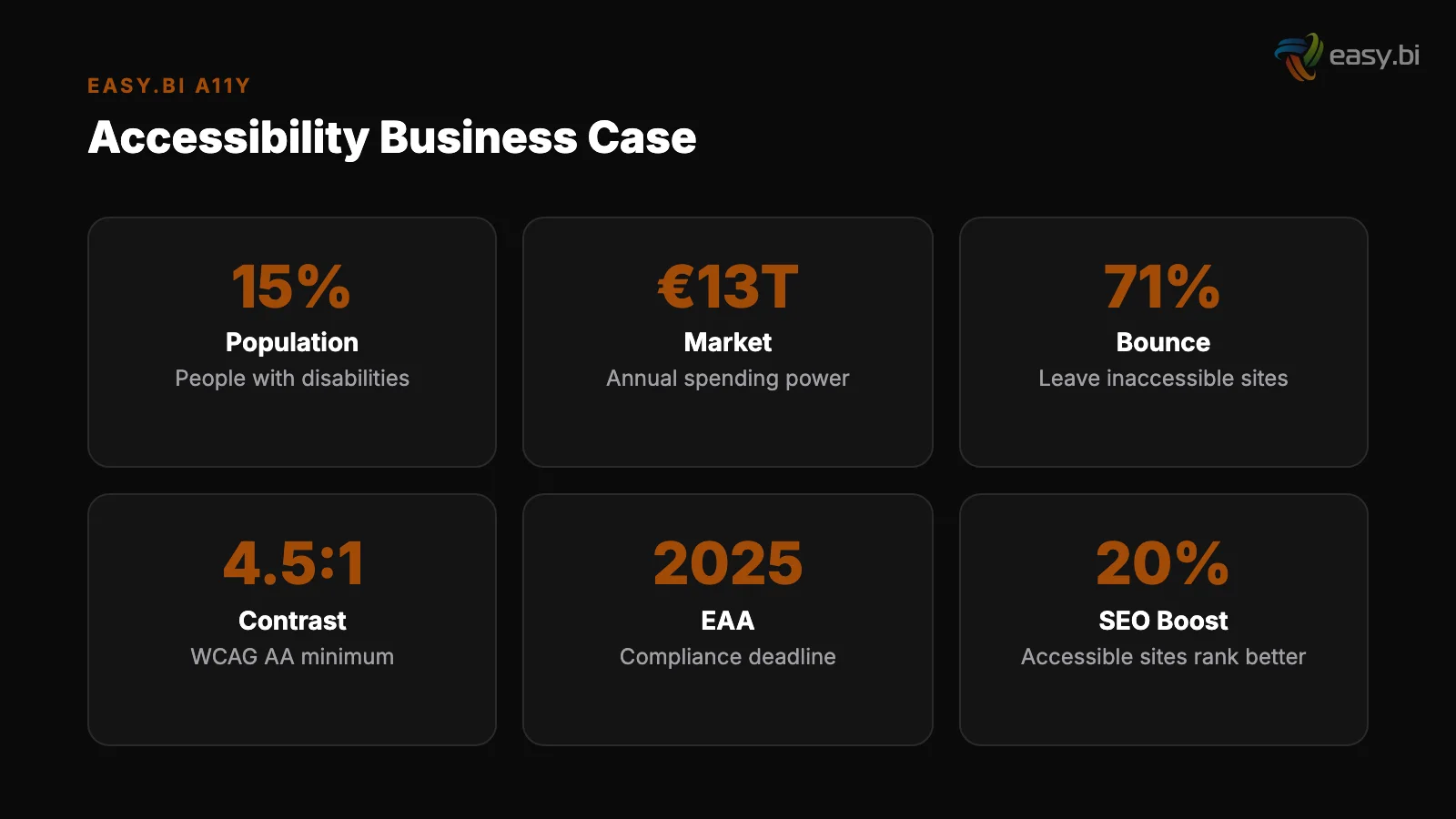
- •15% of the global population - over 1.3 billion people - has some form of disability. Improving accessibility can increase an e-commerce site's customer base by up to 20%. This is not a niche audience. It is a market segment larger than the entire population of the European Union.
- •The European Accessibility Act (EAA) takes effect on June 28, 2025, requiring digital products and services sold in the EU to meet accessibility standards. DACH companies that treat this as a compliance checkbox will spend money without capturing value. Those that treat it as a design principle will gain a competitive advantage.
- •96.3% of home pages have detectable WCAG 2 accessibility failures, with an average of 56.8 errors per page. The baseline is so low that even modest accessibility improvements put you ahead of nearly every competitor. This is a rare opportunity where doing the right thing also provides a competitive edge.
- •Accessibility improvements and SEO improvements are structurally the same work. Semantic HTML, descriptive alt text, proper heading hierarchy, fast page loads, and keyboard navigability improve both search rankings and screen reader compatibility. Every accessibility investment pays dividends in organic visibility.
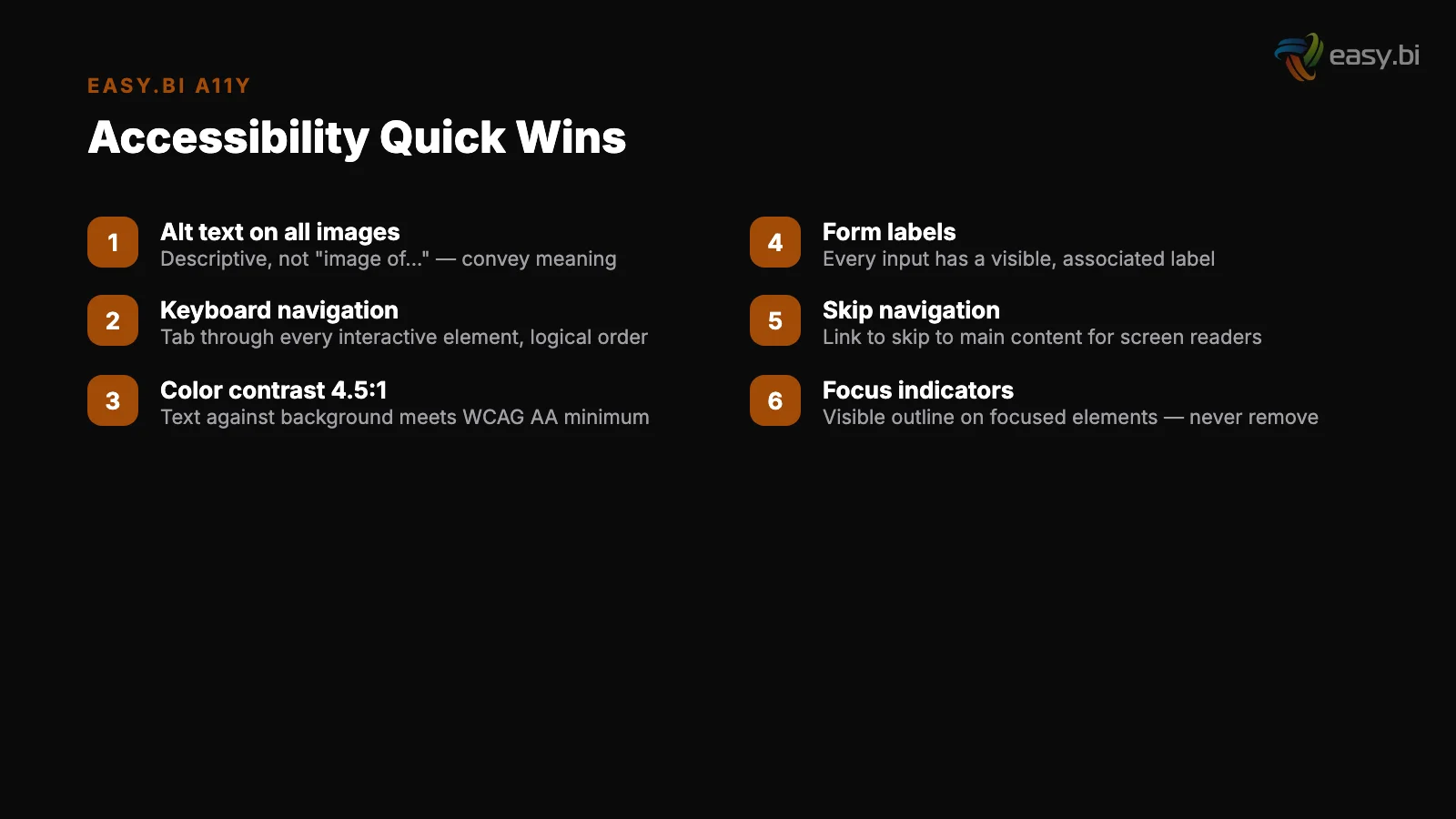
- •You do not need a 6-month accessibility project to make meaningful progress. Five quick wins - semantic HTML structure, alt text for images, color contrast ratios, keyboard navigation, and focus indicators - can be shipped in a single sprint and will resolve the majority of common WCAG failures.
Accessibility is not a legal obligation to minimize - it is a market expansion strategy. Learn how the European Accessibility Act affects your products, why 15% of your potential customers have disabilities, and quick wins you can ship this week to improve both accessibility and SEO.
Most conversations about accessibility in enterprise software start with compliance. "What do we need to do to avoid getting sued?" It is the wrong question, and it produces the wrong outcome - minimal effort, minimal investment, and minimal value.
After leading UX across dozens of enterprise applications, I have seen a different pattern: the teams that approach accessibility as a design principle, not a legal checklist, build better products for everyone and open markets their competitors ignore.
Why Is Accessibility a Business Decision, Not a Legal Checkbox?
15% of the global population has some form of disability [1]. That is over 1.3 billion people. In the EU alone, approximately 87 million people live with a disability. In Germany, 7.8 million people are registered as severely disabled - roughly 9.4% of the population.
These are not edge cases to be handled with a footnote. They are customers, employees, and partners who interact with your digital products every day.
Improving accessibility can increase an e-commerce site's customer base by up to 20% [1].
For a mid-market DACH company doing EUR 10 million in digital revenue, that represents a EUR 2 million addressable opportunity that most competitors are not pursuing - because they are treating accessibility as a cost center rather than a revenue driver.
But the business case extends beyond the disability community. Accessible design benefits everyone:
- Aging populations: Germany's median age is 44.6 years and rising. Larger text, higher contrast, and simpler navigation patterns serve an aging user base that has purchasing power but declining visual and motor capabilities.
- Situational disabilities: A user in bright sunlight cannot see a low-contrast screen. A user in a meeting cannot play audio without captions. A user holding a coffee cup operates with one hand. Accessible design serves these everyday situations.
- Mobile users: Touch targets sized for motor accessibility (44x44 pixels minimum) are the same targets that work reliably on mobile devices. Readable font sizes for vision accessibility are the same sizes that work on small screens.
The companies that understand this do not have an "accessibility team" separate from their product team. They have product teams that design for the full range of human capability as a default, not an afterthought.
See how we deliver AI-powered efficiency gains.
What Does the European Accessibility Act Mean for Your Products?
The European Accessibility Act (EAA), Directive 2019/882, takes effect on June 28, 2025. It requires that a wide range of products and services - including e-commerce platforms, banking applications, e-books, and transport services - meet accessibility requirements when sold in the EU.
For DACH companies, the practical implications are significant:
| EAA Requirement | What It Means | Who It Affects |
|---|---|---|
| Perceivable content | Text alternatives for images, captions for video, sufficient color contrast | All digital products and services |
| Operable interfaces | Keyboard navigability, no time-dependent interactions, no seizure-inducing content | All interactive digital products |
| Understandable information | Consistent navigation, readable text, predictable interface behavior | All digital products and services |
| Robust technology | Compatible with assistive technologies, valid HTML, ARIA attributes | All digital products and services |
| Microenterprise exemption | Companies with fewer than 10 employees and under EUR 2 million turnover are exempt | Does NOT apply to most DACH mid-market companies |
The EAA references WCAG 2.1 Level AA as the technical standard, harmonized through EN 301 549. This means that WCAG 2.1 AA compliance is now the legal minimum for covered products and services in the EU, not a voluntary best practice.
Non-compliance carries penalties that vary by member state. Germany's implementation (Barrierefreiheitsstärkungsgesetz, BFSG) includes fines of up to EUR 100,000 and the possibility of market surveillance authorities ordering products removed from sale. Austria and Switzerland have similar enforcement mechanisms through their respective implementations.
The companies that started accessibility work in 2023-2024 are now in a strong position. Those starting now have a compliance deadline in months, not years.
But even with the urgency, the right approach is not "do the minimum to pass an audit" - it is "build accessibility into the design process so it becomes automatic."
How Big Is the Accessibility Market Opportunity?
The numbers make the business case without requiring any moral argument - though the moral case is strong too.
Direct market expansion: 15% of the global population with disabilities represents $13 trillion in annual disposable income, according to the Return on Disability Group. In the DACH region alone, the disposable income of people with disabilities exceeds EUR 300 billion annually.
Most digital products exclude a meaningful portion of this spending power through inaccessible interfaces.
Direct market expansion
SEO performance: Accessible websites consistently rank higher in search results because accessibility best practices and SEO best practices overlap significantly. Semantic HTML tells search engines what content means. Alt text tells search engines what images show. Heading hierarchy tells search engines how content is structured.
Sites meeting Core Web Vitals thresholds see 24% fewer page abandonments [2] - and accessibility improvements directly contribute to Core Web Vitals scores.
Brand reputation: In a DACH market where 88% of IT decision-makers consider cultural compatibility more important than cost savings [3], accessibility signals organizational maturity and values alignment. Enterprise procurement increasingly includes accessibility requirements in RFPs - a trend accelerated by the EAA.
SEO performance
Legal risk reduction: ADA-related digital accessibility lawsuits in the US exceeded 4,000 in 2023. While the European enforcement model differs, the trajectory is clear. Proactive accessibility investment is cheaper than reactive legal defense and remediation.
Accessibility is the only investment I know of that simultaneously expands your addressable market, improves your search rankings, reduces your legal risk, and makes your product better for every user. The business case writes itself - the question is why more companies are not acting on it.
What Are WCAG 2.1 AA and AAA, and Which Do You Need?
The Web Content Accessibility Guidelines (WCAG) 2.1 define three conformance levels: A (minimum), AA (standard), and AAA (enhanced). Each level includes all requirements from the level below it.
Level A addresses the most basic accessibility barriers. Text alternatives for images. Keyboard accessibility. No content that causes seizures. This is the floor - a product that does not meet Level A is inaccessible to a large portion of users with disabilities.
Level A
Level AA is the target for most organizations and the legal standard referenced by the EAA.
It adds requirements for color contrast (4.5:1 for normal text, 3:1 for large text), text resizing up to 200% without loss of content, multiple ways to find content, and visible focus indicators for keyboard navigation.
Level AAA is the highest standard and is not recommended as a blanket target for entire sites. It includes requirements like sign language for video content, contrast ratios of 7:1, and reading level assessments.
However, specific AAA criteria are worth targeting when they serve your audience - for example, enhanced contrast benefits users in all lighting conditions, not just users with vision impairments.
For DACH mid-market companies, the practical recommendation is: target WCAG 2.1 AA compliance across all digital products, and selectively implement AAA criteria where the effort-to-impact ratio is favorable. Color contrast at 7:1 (AAA) costs nothing more than 4.5:1 (AA) and improves readability for everyone.
Sign language interpretation for all video (AAA) is expensive and serves a smaller audience - implement it for high-traffic content if resources allow.
How Does Accessibility Improve SEO Performance?
The overlap between accessibility and SEO is structural, not coincidental. Both disciplines optimize for the same underlying principle: content should be understandable by machines (search engine crawlers, screen readers) as well as humans.
Semantic HTML: Using <nav>, <main>, <article>, <aside>, and proper heading tags tells screen readers how to navigate content. It also tells search engines how to index and weight content.
A page with a clear <h1> followed by logical <h2> and <h3> subheadings ranks better than one using <div> elements styled to look like headings.
Semantic HTML
Alt text: Descriptive alt attributes on images make content accessible to screen reader users. They also give search engines context for image search indexing. "Siemens Angular component library showing button variants in Storybook" is useful to both a screen reader user and Google Image Search. "Image1.webp" is useful to neither.
Page speed: Accessibility requires that interfaces respond quickly and do not depend on fast network connections. Lazy loading, efficient code, and optimized images serve users on assistive technologies and users on slow connections - and they directly improve Core Web Vitals.
Sites that meet Core Web Vitals thresholds see 24% fewer page abandonments [2].
Alt text
Link text: "Click here" is bad for screen reader users (who hear the link text out of context) and bad for SEO (search engines use anchor text to understand link relevance). "Read the WCAG 2.1 AA guidelines" is good for both.
Video captions: Captions make video content accessible to deaf and hard-of-hearing users. They also provide text that search engines can index, making video content discoverable through search in ways that audio-only content is not.
3x faster development with our ebiCore AI framework
Identify your top AI opportunities, validate with a PoC, and ship to production.
Start with a Strategy CallWhat Are the Quick Wins You Can Ship This Week?
96.3% of home pages have detectable WCAG 2 accessibility failures, with an average of 56.8 errors per page [4]. The five most common failure types account for the majority of these errors, and all five are fixable in a single sprint.
1. Low-contrast text (83.6% of pages). The fix: audit all text colors against their backgrounds using a contrast checker (WebAIM's tool is free). Ensure 4.5:1 ratio for normal text, 3:1 for large text. In a design system, this is a token change that propagates globally. Implementation time: 2-4 hours.
1. Low-contrast text (83.6% of pages)
2. Missing alt text (58.2% of pages). The fix: add descriptive alt attributes to every meaningful image. Use empty alt attributes (alt="") for decorative images. Write alt text that describes the function or content of the image, not its appearance. Implementation time: 4-8 hours for a typical marketing site.
3. Missing form labels (45.9% of pages). The fix: associate every form input with a <label> element using the for/id pattern. This is a one-time fix per form that improves both screen reader navigation and click target size (clicking the label activates the input). Implementation time: 1-2 hours per form.
2. Missing alt text (58.2% of pages)
4. Empty links (49.9% of pages). The fix: ensure every link has descriptive text content or an aria-label attribute. Icon-only links (social media icons, action buttons) need aria-labels that describe their destination or function. Implementation time: 2-3 hours.
5. Missing document language (28.9% of pages). The fix: add the lang attribute to the HTML element (<html lang="en"> or <html lang="de">). This tells screen readers which language to use for pronunciation. Implementation time: 5 minutes per page template.
These 5 fixes resolve the majority of detectable accessibility failures. They do not require redesigns, new components, or architectural changes. They require attention and approximately 2-3 days of engineering effort for a typical mid-market website.
Which Testing Tools Actually Work?
Automated testing catches roughly 30-40% of WCAG issues. The rest require manual testing and user testing. A practical testing strategy combines all three.
Automated tools: axe DevTools (browser extension, free) catches the broadest range of automated issues. Lighthouse (built into Chrome DevTools) provides accessibility scores alongside performance and SEO metrics. WAVE (WebAIM, free) provides visual overlays showing accessibility issues in context. Run all three - each catches issues the others miss.
Automated tools
Keyboard testing: Tab through your entire application without using a mouse. Can you reach every interactive element? Can you see where focus is at all times? Can you activate buttons and links with Enter or Space? Can you dismiss modals with Escape?
Keyboard testing takes 15-30 minutes per page and catches issues no automated tool detects.
Screen reader testing: Test with at least one screen reader. VoiceOver (built into macOS, free), NVDA (Windows, free), or JAWS (Windows, commercial).
Navigate your key user flows and verify that the experience is coherent - that headings describe content sections, that form labels are announced, and that dynamic content updates are communicated.
User testing: Include users with disabilities in your regular user testing sessions. 5 user tests uncover approximately 85% of usability problems [5], and this holds true for accessibility-specific issues as well. Users who rely on assistive technologies daily will find problems that no automated tool or sighted tester will catch.
Building Accessibility Into Your Design System
The most sustainable approach to accessibility is embedding it into the components your teams use to build interfaces. When the button component is accessible by default - with proper focus states, ARIA attributes, and contrast ratios - every button in every application is accessible without individual developer effort.
Design systems reduce design and development time by 25-50% [6]. When accessibility is built into the design system, it reduces accessibility remediation time by a similar margin. Instead of auditing every page for contrast issues, you verify the design tokens once.
Instead of checking every form for label associations, you build them into the form component.
The components that matter most for accessibility:
- Buttons and links: Focus visible state, minimum 44x44 pixel touch target, ARIA labels for icon-only variants, loading state announcements
- Forms: Label associations, error message announcements, required field indicators that work for screen readers, inline validation feedback
- Modals and dialogs: Focus trapping, Escape key dismissal, aria-modal attribute, focus return to trigger element on close
- Navigation: Skip links, aria-current for active page, landmark roles, mobile menu keyboard accessibility
- Data tables: Proper th/td structure, caption elements, scope attributes for complex headers, responsive table patterns that maintain accessibility on mobile
Building these patterns once, at the design system level, means every product team inherits accessibility compliance automatically. The upfront investment is measured in weeks. The ongoing savings are measured in years.
For the complete framework on building data-driven UX systems that include accessibility as a first-class concern, read our pillar guide on the data-driven UX system. For how enterprise design systems like Siemens' embed accessibility into reusable components, see design systems at enterprise scale.
And for practical approaches to mobile UX in B2B enterprise applications - where accessibility is often overlooked - read mobile UX for B2B enterprise.
If your digital products need to meet the European Accessibility Act deadline and you want to use that compliance work to also expand your market, improve your SEO, and build better products, explore our UX growth approach.
Accessibility done right is not a tax on development - it is an investment that pays returns across every metric that matters.
References
- [1] W3C Web Accessibility Initiative (2023). w3.org
- [2] Google / web.dev (2023). web.dev
- [3] WKO / IDC Austria (2024).
- [4] WebAIM (2024). "96.3% of home pages have detectable WCAG 2 accessibility failure webaim.org
- [5] Nielsen Norman Group (2023). nngroup.com
- [6] Sparkbox (2023). "Design systems reduce design and development time by 25-50%. sparkbox.com
Explore Other Topics
Ready to unlock AI-driven efficiency?
30-minute call with an engineering lead. No sales pitch - just honest answers about your project.
98% engineer retention · 14-day delivery sprints · No lock-in contracts
Related Reading

Technical Debt Is a Business Decision - Here's How to Make It
Technical debt is not a failure of engineering discipline - it is a financial instrument. Learn the four types of tech debt, when to take it on intentionally, how to quantify it in business terms, and practical refactoring strategies that keep feature development moving.
Filip Kralj
The essential elements of business software solutions
Explore key elements of enterprise software for manufacturing and engineering success, from SaaS to cloud computing and team management.
Filip Kralj
Why Should Your Business Consider High-Impact Process Reengineering?
Transform your business with process reengineering to boost efficiency, streamline operations, and drive innovation for competitive advantage.
Andrej Lovsin